
How do I transcribe a whole folder of audio files at once? Open the folder, select every file, and drop them on Whisper Notes. They are transcribed one after another on your device, and nothing is uploaded.
- Mac: drag the files onto the window, or pick several in the import window.
- iPhone: tap the folder button and select several files, or share up to 20 at once from another app.
- Terminal: in the Mac app from our website, a short loop over
wn transcribe.
Which versions can transcribe many files at once?
| iPhone | Mac App Store version | Mac app from our website | |
|---|---|---|---|
| Pick several files at once | Yes | Yes | Yes |
| Drop several files on the window | — | Yes | Yes |
| Share several files from another app | Yes, up to 20 | — | — |
| Choose a folder itself | No, select the files in it | No, select the files in it | No, select the files in it |
| Watched folder | No | No | No |
| Command line | — | — | Yes (wn transcribe) |
| Price | $7.99 once | $7.99 once, the same purchase as the iPhone app | 5,000 words a week free, then $14 once |
Green means available, amber means not available, — means it doesn't apply.
How long does a batch take?
Files run one after another, so the wait is the total length divided by the model's speed. For 10 hours of recordings on a MacBook Air (M5):
| Model | Speed (× real time) | 10 hours of audio |
|---|---|---|
| SenseVoice Small | 115–131× | about 5 min |
| Parakeet (built in) | 75.8× | about 8 min |
| Apple Speech | 19.7× | about 30 min |
| Qwen3-ASR 1.7B | 7.6× | about 1 h 20 min |
| Whisper Small | 6.5× | about 1 h 30 min |
| Whisper Large V3 Turbo | 2.7× | about 3 h 40 min |
Speed as shown on each model's card in the Mac app; it counts model processing time only. Which model is most accurate for your language: Which Model for Your Language?
How to batch transcribe on Mac
- Open the folder in Finder and press ⌘A to select every recording.
- Drag them onto the Whisper Notes window. Or click the import button and select several files in Import Audio or Video.
- Each file shows up under Imported and is transcribed in turn. If you start a recording meanwhile, the batch waits and then carries on.
Drop the files, not the folder: folders aren't imported. Each transcript is also saved as a Markdown file next to its audio. In the Mac app from our website that is ~/Documents/WhisperNotes/Imports by default; in the Mac App Store version you choose the folder in Settings → Storage. Pointing it at an Obsidian vault puts every transcript there.
How to batch transcribe on iPhone
- Tap the folder button next to the record button.
- In Files, tap Select, pick the recordings, then tap Open.
- Files waiting their turn show "Waiting to transcribe…". Keep Whisper Notes open until the last one is done.
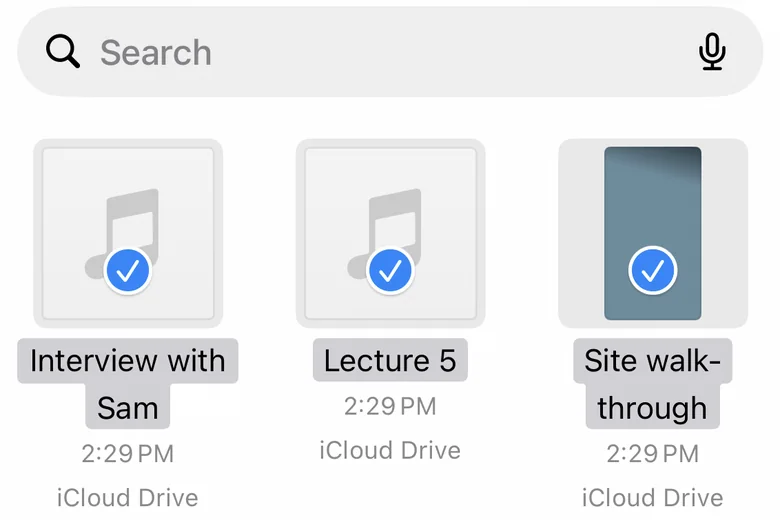
Selecting several recordings in Files on iPhone
To get the results as files, press and hold a note, tap Select All, then ⋯ → Export Files…: one TXT, SRT or Markdown file per note. Auto-export Transcripts in Settings saves a .txt of every new transcript to a folder you choose, such as iCloud Drive.
How to transcribe a folder from Terminal
In the Mac app from our website, wn transcribe transcribes one file and prints the text. This loop runs it on every recording in ~/Recordings, subfolders included, and writes a .txt next to each one:
find ~/Recordings -type f \( -iname '*.m4a' -o -iname '*.mp3' -o -iname '*.wav' \) |
while IFS= read -r f; do
  wn transcribe "$f" < /dev/null > "${f%.*}.txt"
done
Whisper Notes must be running with Local CLI & MCP turned on in Settings → Integrations. Each transcript also lands in the app's history. Setup and every command: CLI & MCP Server.
When is another app a better fit?
If you want a folder that is watched and transcribed automatically, MacWhisper Pro has watched folders. If you transcribe batches by hand and want the same app on your iPhone, with everything kept on the device, Whisper Notes does that.
Frequently Asked Questions
Can I transcribe a whole folder, including subfolders?
In the app, select the files inside the folder: ⌘A in Finder on Mac, Select in Files on iPhone. Folders themselves aren't imported. The Terminal loop on this page also walks subfolders, in the Mac app from our website.
Does Whisper Notes have a watched folder?
No. New recordings have to be added by hand, or by running the Terminal loop again.
Is there a limit on how many files I can add?
Sharing from another app on iPhone takes up to 20 files at a time, and the iPhone skips files that don't fit in its free storage. In the Mac app from our website, the free 5,000 words a week is under an hour of speech; the $14 license removes the limit.
Are my files uploaded anywhere?
No. Every file is transcribed on your Mac or iPhone. The internet is only used to download models.
 Download for iOS