
MacWhisper Alternative: The Case for Simplicity
Same local models — Whisper Large-v3 Turbo and NVIDIA Parakeet. $7.99 on iOS, free trial on Mac. No subscription.

MacWhisper is a capable tool. It pioneered local Whisper transcription on macOS, and its Pro version offers an impressive array of features for audio professionals. But over time, we've observed a pattern: most users don't need 50 export formats, podcast chapter markers, or video synchronization. They need to turn voice into text. Quickly. Without configuration.
Whisper Notes was built on a different philosophy: do one thing well. No feature creep. No complexity tax. The same underlying Whisper engine, wrapped in the simplest possible interface, at a price that reflects what most people actually need. The result is roughly a 10x price difference for the same core capability.
What is MacWhisper?
MacWhisper is a macOS transcription app from Jordi Bruin and the team at Good Snooze in the Netherlands, and it is largely the reason running Whisper locally on a Mac became normal. The free version is genuinely useful on its own: microphone recording, 100 languages, .srt/.vtt/.txt export, YouTube URLs and batch transcription. MacWhisper Pro is a €64 one-time purchase that adds export formats, AI integrations, meeting recording, watched folders and CLI access.
Buy it from macwhisper.com. The developer warns that legitimate purchases only go through the Gumroad page or the App Store, and that lookalike download sites have been caught bundling malware.
Whisper Notes runs the same engines on the same hardware, in a smaller app that also exists on iPhone. The rest of this page is about which of those two shapes fits the way you work, because on the underlying transcription there is not much between them.
The Price Anchor: €64 vs. $14
MacWhisper Pro's lifetime licence is €64 as a one-time purchase from the official Gumroad store, priced only in euros. The Mac App Store version is a separate app called Whisper Transcription, whose Pro Lifetime unlock is listed at $89.99–$99.99. It runs Whisper models up to Large-v3 Turbo, plus NVIDIA's Parakeet.
Whisper Notes is $14 for the Mac direct download and runs the same model families: Whisper Large-v3 Turbo, with Parakeet V3 as the default engine on Mac. On identical audio with the same model selected, the transcript is the same, because the model is the thing doing the work and neither app modifies it.
Core Engine Comparison
| Capability | Whisper Notes | MacWhisper Pro |
|---|---|---|
| AI Models | Parakeet V3 (default) · Whisper Large-v3 Turbo · SenseVoice — all included | Whisper (tiny → Large-v3 Turbo) · Parakeet |
| Processing | 100% on-device | 100% on-device |
| Languages | 100+ | 100+ |
| Speed (M-series Mac) | ~60× real-time on the Parakeet V3 default | ~10-12× real-time on the Whisper Turbo route; Parakeet is a Pro feature |
| Direct Price (official site) | $14 one-time (free for 5,000 words a week) | €64 one-time (Gumroad) |
| App Store Price | $7.99 (lifetime) | $89.99 Pro Lifetime (as "Whisper Transcription") |
That price difference isn't paying for better transcription. It's paying for features that wrap around that transcription: batch processing pipelines, dozens of export formats, system audio capture, and professional archive tools.
If you need those features, MacWhisper Pro is worth its price. But if you just need to turn voice into text, which is the core function, the same engine costs $14.
MacWhisper Pricing: Lifetime License, Subscription, and Discount Codes
If you came here looking for a MacWhisper discount code or a cheaper Pro licence key, the short answer is that there isn't one to find. Here is what the app actually costs and what the alternatives are.
MacWhisper Pricing Options vs. Whisper Notes
| Option | Price | What you get |
|---|---|---|
| MacWhisper Free | €0, free forever | Mic recording, 100 languages, .srt/.vtt/.txt export, YouTube & batch transcription |
| MacWhisper Pro lifetime | €64 one-time ("Pay Once", Gumroad) | Full Pro feature set, Mac only, lifetime updates |
| Whisper Transcription (App Store version) | Pro subscriptions listed at $6.99 / $8.99 / $29.99; Pro Lifetime $89.99 | Separate App Store app by the same developer; doesn't accept MacWhisper license keys |
| Whisper Notes | $7.99 one-time (iOS); free trial + one-time unlock (Mac) | Same Whisper engine, Fn dictation, iPhone + Mac |
A few things worth knowing before you keep hunting for coupons:
• There is no evergreen public coupon — but there is an official student discount. MacWhisper doesn't publish a permanent discount code, and most "MacWhisper discount code" pages you'll find are affiliate link farms. The developer's official support docs do offer 25% off for students, journalists, and nonprofits on request (you email for a code), plus volume packs from €54/license for 5 licenses down to €44/license for 50.
• Be careful with resold or "free" license keys. A legitimate MacWhisper Pro license key comes only from the official Gumroad store — the developer explicitly warns that scam websites impersonating macwhisper.com may contain malware downloads. A personal license has a soft limit of 3 device activations, and keys activated on too many devices can be automatically disabled, so "free MacWhisper Pro license key" downloads found on forums are pirated and commonly stop working. License keys offered outside the official store can be revoked or already activated; if you buy MacWhisper, buy it from the official source.
• Do the subscription math. The direct-download version of MacWhisper has no subscription at all — it's €64 pay-once with lifetime updates. Subscriptions exist only in the App Store version (Whisper Transcription), where a few months of Pro can approach the cost of a one-time license, so subscriptions only make sense for short, one-off projects.
• Or skip the coupon hunt entirely. If what you actually need is accurate local speech-to-text — not batch pipelines or 50+ export formats — Whisper Notes runs the same Whisper Large-v3 Turbo engine for $14, less than any discounted MacWhisper price.
No discount code required: the Mac version of Whisper Notes has a free tier of 5,000 words a week, so you can verify the transcription quality is identical before paying anything.
2026 Update: Both Apps Moved Beyond Whisper
The "same engine" story used to end at Whisper Large-v3 Turbo. It doesn't anymore, and it's worth being precise about what each app ships in 2026.
MacWhisper added NVIDIA's Parakeet model in version 13 (June 2025) as a Pro feature. Credit where due — it was among the first Mac apps to offer it.
Whisper Notes went further and made Parakeet V3 the default Mac engine. On the Open ASR Leaderboard it scores 6.32% English word error rate versus 7.83% for Whisper Large-v3 Turbo, and it covers 25 European languages. On our M5 Air it runs at roughly 60× realtime. For Chinese, Japanese, Korean, and Cantonese you switch to SenseVoice, which transcribed a 27-minute Chinese podcast in 13.83 seconds on an M4 Pro. Whisper models remain available for the long tail of 100+ languages.
The pricing difference stays the same shape: every engine in Whisper Notes — Parakeet V3, Whisper, SenseVoice — is included in the $14 one-time price and the free Mac trial. There is no Pro tier to unlock.
If you're comparing the two apps on transcription quality alone: for the same model on the same audio, output is equivalent. The questions that actually decide it are which models are included at which price, and whether you want a file-processing suite or a dictation-first tool.
The Ecosystem Tax: Mac-Only vs. Native on Both Platforms
Here's a detail that often surprises users comparing options:
MacWhisper is a Mac application. If you want Whisper-powered transcription on your iPhone, you need a different solution. The ecosystems are separate. (The same developer does sell a separate iPhone/iPad app on the App Store, Whisper Transcription — but it uses its own in-app subscriptions and does not accept MacWhisper license keys.)
Whisper Notes uses one-time pricing. One App Store purchase includes the iPhone/iPad app and the Mac App Store version; the direct-download Mac DMG has a free trial and is sold separately. Each version is native to its platform.
• Mac version: Full Large-v3 Turbo, system-wide Fn dictation, waveform navigation
• iOS version: Optimized for mobile Neural Engine, instant voice capture
• Simple pricing: $7.99 on iOS, free trial + one-time purchase on Mac
If you work across devices, capturing thoughts on the phone during a commute and finishing the document at a desk, having a native app on both ends is the difference between one workflow and two. The App Store purchase covers iPhone/iPad and Mac App Store; the more capable direct-download DMG is a separate one-time license.
The architectural note: Because both apps are 100% offline, there's no automatic cloud sync between devices. Your recordings stay on the device where you created them. This is intentional, because we do not operate sync servers that could be breached. Use AirDrop or manual export when you need to move files.
This trade-off (no sync) enables the benefit (no sync server vulnerabilities). For users who prioritize data sovereignty, the calculation is straightforward.
How many controls do you want on screen?
MacWhisper Pro carries the longer feature list, and its interface shows it: 50+ export formats, podcast chapter detection, video sync, system audio recording, batch queues, translation pipelines and archive management, reached through settings panels, format selectors and queue managers.
If you process hundreds of hours of recordings — audio archivists, podcast producers, anyone maintaining a library — that density is the product working correctly. The controls exist because the jobs genuinely differ from each other, and a simpler app would just mean doing the difference by hand.
Whisper Notes shows a record button, a transcript and a waveform, because it does fewer things. There is no export matrix and no processing queue, which is a real limitation if you needed one and invisible if you did not.
Interface Philosophy
MacWhisper Pro
Settings panels, export matrices, batch queues, format selectors, processing options. Power through configuration.
Whisper Notes
Record button. Transcript. Waveform. Copy. Done. Power through simplicity.
We designed for the 99% of users who just want to turn voice into text instantly, without configuring 20 settings first. Every added feature is one more thing on screen to read past.
Neither shape is better than the other. If those features are ones you use, not having them is the problem, and simplicity is no consolation.

Files you already have, or words you are about to say?
The interface difference follows from a difference in when you reach for the app. MacWhisper is built around files that already exist: you import them, run them through a pipeline, and export text. That is the right shape for "I have 50 podcast episodes to transcribe."
Whisper Notes is built around the moment of speaking: you hold a key, talk, and the text lands where the cursor already was. That is the right shape for "I want this down before I lose it." Neither is better in the abstract, and if your work is mostly the first kind, nothing further down this page will change that.
File Converter Workflow (MacWhisper)
Record audio → Save file → Open MacWhisper → Import → Select model → Configure settings → Process → Wait → Export → Paste text
Thinking Tool Workflow (Whisper Notes)
Hold Fn key → Speak → Release → Text appears at cursor
The Fn key architecture is central to Whisper Notes on Mac. Press and hold Fn in any application, whether that is Gmail, Slack, VS Code, Notes or your terminal, then speak and release. Your speech becomes text at the cursor position. No app switching. No file management. No export step.
This is dictation, not conversion. The distinction matters because it changes when you reach for the tool:
• File converters are for after the fact. You have recordings. You need transcripts.
• Thinking tools are for in the moment. You have thoughts. You want them captured before they fade.
Both are valid use cases. But they're different tools, which is why they're priced differently.

When MacWhisper Is the Right Choice
MacWhisper Pro is not overpriced; €64 buys a lot of app. It is worth being specific about when that is the one to buy:
Choose MacWhisper Pro (€64 one-time) if:
• You process large archives of existing audio files regularly
• You need specialized export formats (VTT, AVID markers, Final Cut XML)
• You work with video files and need synchronized subtitles
• You're a podcast producer managing episode transcripts at scale
• You need batch processing queues for high-volume work
These are legitimate professional needs. If you check multiple boxes above, the €64 investment pays for itself in workflow efficiency.
MacWhisper Pro is a professional tool with a professional price. For people who need those features, the feature set is what the money buys.
What Whisper Notes offers is a different value proposition: the same transcription engine, without the professional wrapper, for users who don't need the wrapper.
When Whisper Notes Makes Sense
Whisper Notes is built for a different user profile:
Choose Whisper Notes ($14) if:
• You want to speak instead of type throughout your day
• You need transcription on both Mac and iPhone
• You value simple interfaces over feature density
• You want one-time pricing without subscriptions
• You prioritize data privacy (100% offline, no accounts)
• You don't need batch processing or specialized export formats
The question to settle first: are you mostly transcribing files you already have, or capturing things as you say them?
If your primary use case is "I have audio files to transcribe," MacWhisper's architecture serves you better.
If your primary use case is "I want to capture thoughts and replace typing with speaking," Whisper Notes' architecture serves you better.
Same models. Different wrapper. The price difference is the complexity you are buying, or choosing not to buy.
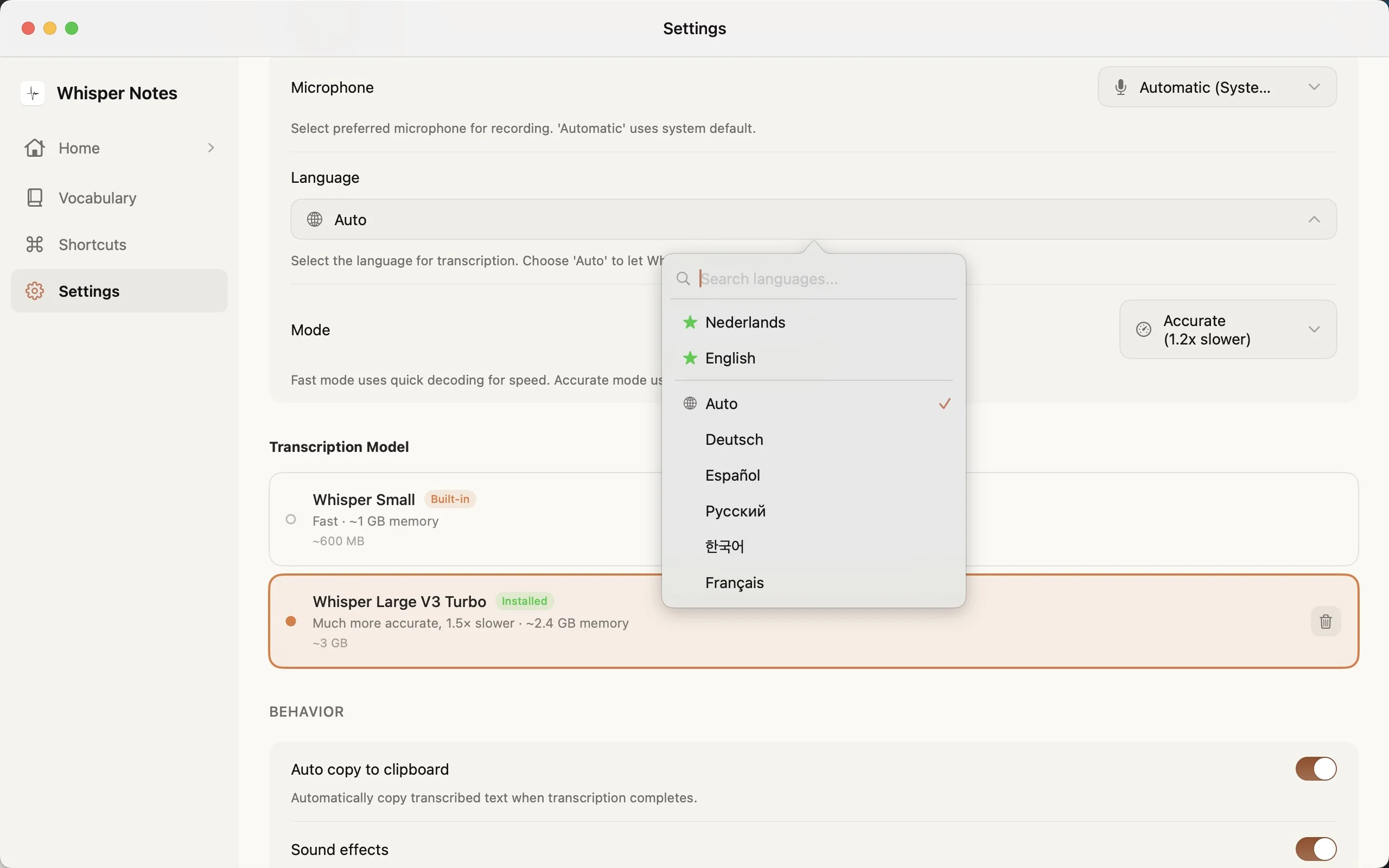
The Simplicity Argument
Software grows because the requests are all reasonable one at a time, and MacWhisper grew that way, from a plain Whisper interface into a full audio processing suite. For someone who needs the suite, that is the product getting better every year. For someone who wanted the plain interface, it is a bill for capability they will not open.
Whisper Notes stays at speech to text on purpose, and the pricing is the same shape: $7.99 on the App Store, or 5,000 words a week free and then $14 for the Mac direct download.
• No subscription fees for software that runs on your hardware
• No account creation for offline-only functionality
• No settings maze to navigate before your first transcription
The trade-off is real: we lack MacWhisper's power features. No 50 export formats. No video sync. Batch work now has an answer, though — the Mac app ships a command-line tool and MCP server, so transcription and export can be scripted or driven by an AI assistant.
For users who need those capabilities, MacWhisper Pro at €64 is the right choice.
For anyone who just wants voice turned into text, quickly and privately and on both devices, Whisper Notes exists.
$7.99 on iOS. Free trial on Mac. The same model families — Whisper and Parakeet. Just simpler.
Frequently Asked Questions
Does Whisper Notes use the same AI model as MacWhisper Pro?
Yes — the same model families. Both apps run OpenAI's Whisper Large-v3 Turbo locally on Apple Silicon, and both have added NVIDIA Parakeet (MacWhisper since version 13 as a Pro feature). In Whisper Notes, Parakeet V3 is the default Mac engine — 6.32% vs 7.83% English WER on the Open ASR Leaderboard, and ~60× realtime on our M5 Air — and you can select SenseVoice for Chinese, Japanese, Korean, and Cantonese. All engines are included in the one-time price. For the same model on the same audio, accuracy is identical; the difference is the features wrapped around the engines and what you pay for them.
Why is Whisper Notes so much cheaper than MacWhisper Pro?
Different scope. MacWhisper Pro is a comprehensive audio processing suite with features for podcast producers, archivists, and video editors. Whisper Notes is a single-purpose tool: speech to text. The price difference reflects the professional features you may or may not need, rather than the transcription quality.
Is there a MacWhisper discount code or coupon?
MacWhisper discount code searches usually come from users comparing the €64 Pro license with cheaper alternatives. There is no evergreen public coupon, though MacWhisper's official docs offer a 25% student/journalist/nonprofit discount on request. Whisper Notes is not a MacWhisper coupon; it is a simpler alternative with $7.99 iOS pricing and a free Mac trial plus one-time Mac unlock. If you only need local speech to text and Fn key dictation, compare total cost before looking for a discount.
Does Whisper Notes have a CLI like MacWhisper's mw command?
Yes. The Mac Direct Download (DMG) build, 1.5.5 and later, ships a whispernotes command-line tool plus a built-in MCP server. Beyond transcribing files from a script, it can search and read your entire transcript history and batch-export every note as TXT or Markdown with the audio alongside — and because the MCP server is included, Claude Desktop, Claude Code or any MCP client can query your transcripts directly. Everything runs over a local Unix socket with no open ports, off by default. Setup guide: whispernotes.app/cli-mcp
Do I need a MacWhisper Pro license key for Whisper Notes?
No. Whisper Notes is a separate app and does not use MacWhisper license keys. MacWhisper Pro license keys unlock MacWhisper Pro features. Whisper Notes has its own purchase flow: App Store on iPhone and a direct-download Mac version that is free for 5,000 words a week.
How does MacWhisper pricing compare with Whisper Notes?
MacWhisper Pro is a €64 one-time purchase from the official Gumroad store (the App Store version is a separate app, Whisper Transcription, with a Pro Lifetime unlock listed at $89.99). Whisper Notes is $7.99 on iOS, with a free trial and one-time purchase on Mac. The better choice depends on scope: MacWhisper Pro is stronger for batch audio and export-heavy workflows; Whisper Notes is built for simple local dictation and capture.
Does MacWhisper have an iOS app?
MacWhisper is Mac-only. For iPhone transcription, you would need a separate app, and the same developer sells one on the App Store app, Whisper Transcription, for iPhone and iPad, but it uses in-app subscriptions and doesn't accept MacWhisper license keys. Whisper Notes offers native apps on both platforms—$7.99 on iOS (App Store), free trial + one-time purchase on Mac. Each optimized for its platform.
What's the advantage of MacWhisper's subscription option?
The direct-download version of MacWhisper has no subscription: it is a €64 one-time purchase with lifetime updates. Subscriptions exist only in the App Store version, a separate app called Whisper Transcription, whose Pro tiers are listed at $6.99, $8.99, and $29.99 (the listing doesn't spell out the billing periods) alongside a Pro Lifetime unlock at $89.99. A subscription can make sense for short-term projects; for ongoing use, a one-time license is more economical. Whisper Notes is sold once at $14, because we think transcription tools should be owned, not rented.
Can Whisper Notes batch-process multiple audio files?
No. Whisper Notes processes one recording at a time, optimized for quick capture workflows. If you need to transcribe archives of audio files in batch, MacWhisper Pro's queue system is better suited for that use case.
Which tool is better for daily dictation?
Whisper Notes, by design. The system-wide Fn key shortcut lets you speak in any application: hold Fn, speak, release, and the text appears at the cursor. MacWhisper is architecturally designed for file transcription rather than live dictation workflows.
Try the Simpler Option
$7.99 on iOS, free trial on Mac. Same models. No complexity tax.
 Download on the App Store