
Cloud transcription is dead. It just doesn't know it yet.
Your phone has a Neural Engine. Use it.
The Latency Problem
The cloud transcription pipeline: you speak, audio uploads to a server, the API processes it, results come back. Even "real-time" services add 2-3 seconds of network round-trip for a 10-second recording.
Local transcription: all that latency disappears. Audio never leaves your device, processing happens on-chip, results appear instantly. No upload, no waiting, no spinning "processing" indicator.
Meanwhile, your iPhone has a Neural Engine capable of 15 trillion operations per second. It's sitting there, idle, while your voice bounces across the Atlantic.
This is physically absurd.
In 2019, cloud transcription made sense. Your phone couldn't run a billion-parameter neural network. That constraint is gone. The iPhone 15 Pro runs Whisper models faster than most cloud services return results. The M3 MacBook processes 60 minutes of audio in 5 minutes—locally, offline, with no upload.
Cloud transcription persists through inertia, not technical necessity.
You Already Paid for the Chip
Here's something that should bother you.
Apple charges a premium for the M3 chip. You paid for it. That Neural Engine? You own it. The 18 billion transistors optimized for machine learning? Yours.
Then you pay $10/month to Otter.ai to transcribe audio on their servers.
You're renting someone else's hardware when you already own hardware that's faster. This is like buying a sports car and paying for taxi rides.
The economics of cloud transcription made sense when local inference was impossible. Now it's just a tax on inertia. Over three years, a $10/month subscription costs $360. Whisper Notes costs $6.99 once. Same accuracy. Faster processing. Your chip does the work it was designed to do.
| Service | Year 1 | Year 3 | Year 5 |
|---|---|---|---|
| Cloud subscription ($10/mo) | $120 | $360 | $600 |
| Whisper Notes (one-time) | $6.99 | $6.99 | $6.99 |
We don't charge subscriptions because we don't run servers. Your audio never touches our infrastructure. There's nothing to bill monthly for.
Data Leaks Are Architectural
Let's be direct about privacy.
When you use a cloud transcription service, your audio lives on someone else's servers. Those servers have employees with access. Those servers connect to networks. Those networks face attacks. Data breaches aren't accidents—they're architectural inevitabilities of storing sensitive data on third-party infrastructure.
Voice data carries a unique risk. Unlike a password, you can't reset your voice. Your vocal patterns are permanent biometric identifiers. Once leaked, they're compromised forever. Attackers can use voiceprints for authentication bypass, identity fraud, or deepfake generation.
The only way to eliminate this risk is to eliminate the upload. Audio that never leaves your device cannot be part of a server-side breach. This isn't a feature—it's physics.
Consider who records sensitive audio:
- Lawyers recording client consultations
- Therapists documenting patient sessions
- Journalists protecting sources
- Executives capturing strategic discussions
- Doctors noting patient histories
For these professionals, cloud storage isn't just inconvenient—it's a liability. Local transcription isn't a preference. It's a requirement.
On Accuracy: The Honest Trade-off
We need to be direct about what local transcription does well and where it falls short.
What local Whisper does better: Verbatim transcription. If you need an exact record of what was said—every word, every pause, every "um"—local Whisper models excel. Word error rates of 5-8% on clean audio match human transcriptionists. The transcript is faithful to what was spoken.
What cloud AI does better: Summarization and extraction. GPT-4o can listen to a meeting and produce action items, summaries, and follow-up tasks. It understands context beyond the literal words. If you want "tell me what decisions were made," cloud AI is genuinely better.
The trade-off is real. If your workflow is "transcribe → summarize with Claude/GPT," you get the best of both: accurate local transcript, intelligent cloud summary. Your raw audio stays private. Only the text you choose to share leaves your device.
We don't pretend local AI solves everything. We believe in using the right tool for each job. Whisper is the right tool for transcription. LLMs are the right tool for understanding. Combining them—locally where privacy matters, cloud where intelligence matters—is the honest approach.
| Task | Best Tool | Why |
|---|---|---|
| Verbatim transcript | Local Whisper | Privacy, speed, accuracy |
| Meeting summary | Cloud LLM (on transcript) | Contextual understanding |
| Action item extraction | Cloud LLM (on transcript) | Semantic reasoning |
| Real-time collaboration | Cloud service (Otter, etc.) | Multi-user coordination |
Real Speed Numbers
On an M3 MacBook Pro, Whisper Large-v3 Turbo processes audio at roughly 12x real-time. A 60-minute recording finishes in about 5 minutes.
On an iPhone 15 Pro, the optimized models run at roughly 5x real-time. Same 60-minute recording takes about 12 minutes.
Compare this to cloud services:
| Recording | Cloud (typical) | M3 Mac (local) | iPhone 15 Pro (local) |
|---|---|---|---|
| 5 minutes | 45-90 seconds | ~25 seconds | ~60 seconds |
| 30 minutes | 3-6 minutes | ~2.5 minutes | ~6 minutes |
| 60 minutes | 6-12 minutes | ~5 minutes | ~12 minutes |
Local processing matches or beats cloud speed for most recording lengths. And it works on airplanes, in basements, in secure facilities—anywhere you don't have connectivity.
How We Built It
Whisper Notes is our implementation of these principles. A few specific decisions worth noting:
Lock Screen Widgets
The best thoughts arrive at inconvenient moments. We built lock screen widgets so you can start recording with one tap—no app launch, no authentication, no connectivity check. Local processing means instant availability.
One tap to record. Zero network dependency.
Hardware-Adaptive Models
Macs have thermal headroom and ample power. iPhones live in your pocket. We deploy different model configurations for each: Whisper Large-v3 Turbo (809M parameters) on Mac, optimized smaller models on iPhone. Same privacy guarantees, appropriate resource use.
Your Data, Your Files
Transcripts are files on your device. Standard formats, standard locations. No proprietary database, no vendor lock-in. If Whisper Notes disappears tomorrow, your recordings remain accessible. Bulk export isn't a premium feature—it's the natural state of data you own.
Your data. Your formats. Your destination.
Custom Vocabulary
Technical jargon, unusual names, domain-specific terms—the vocabulary that most needs accurate transcription is often what you least want uploaded. Initial prompts let you add context locally. The model adjusts without your terminology becoming training data.
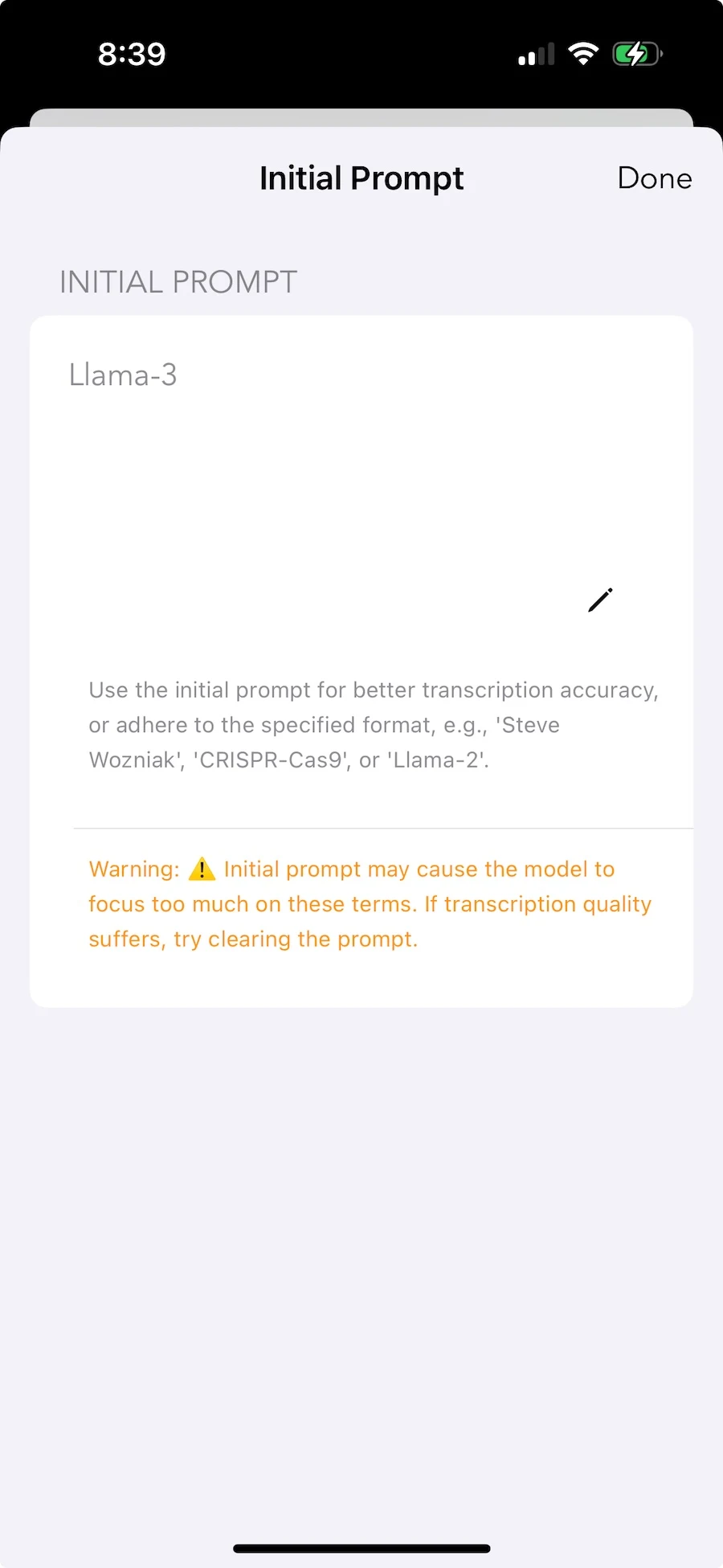
Local personalization. Your vocabulary stays private.
When Cloud Works Better
We're not pretending local transcription is universally better. Cloud has genuine advantages:
Real-time team collaboration. Five people editing a transcript simultaneously during a meeting requires server coordination. Local tools are single-user by nature.
Speaker identification at scale. "Who said what" in multi-speaker recordings benefits from cloud-scale training data. On-device diarization exists but with lower accuracy for large groups.
Workflow automation. Cloud services connect to CRMs, extract action items, send summaries to Slack. Local tools produce text files—what you do with them is manual.
Older hardware. Pre-A14 iPhones, Intel Macs—some devices can't run local inference practically. Cloud remains the only option.
The honest assessment: if your primary need is team collaboration during live meetings, cloud tools are probably better. If your primary need is transcribing your own recordings with privacy, local tools are the right architecture.
The Trajectory
Each chip generation brings more Neural Engine performance. Each model iteration brings better efficiency. The gap between local and cloud narrows while privacy and latency advantages remain constant.
Cloud transcription made sense when your phone couldn't do the work. That era ended around 2022. What remains is inertia—subscriptions on autopay, workflows built around server assumptions, the vague belief that cloud must be better.
The question isn't whether local transcription works. It does. The question is whether you want to keep paying rent on hardware you already own.
Technical Details
Device requirements: iPhone 12+ (A14 chip) or Mac with M-series chip.
Models: Parakeet V3 (103x realtime, 6.32% WER for English). SenseVoice Small (52x realtime for Chinese, Japanese, Korean, Cantonese). Whisper Large V3 Turbo (100+ languages). All three run locally on Mac.
Speed: Parakeet V3: 35 min audio in 20 seconds on M4 Pro. SenseVoice: 27 min Chinese podcast in 14 seconds. Whisper Turbo: 35 min in ~3 minutes.
AI Editing: On-device Gemma 4 cleans punctuation, removes filler words (um, uh), generates titles, and answers questions about your transcript.
Price: $6.99 once. Free trial on Mac. No subscription because we don't run servers.
Frequently Asked Questions
Can transcription be done without an internet connection?
Yes. Whisper Notes is offline transcription software that runs entirely on your device. All three AI models — Parakeet V3, SenseVoice, and Whisper — process audio locally using your Mac's Neural Engine or iPhone's A-series chip. No data is uploaded, no server is contacted. You can test this yourself by enabling airplane mode.
Does OpenAI Whisper work offline?
Yes. OpenAI released Whisper as an open-source model, which means it can run locally on your hardware. Whisper Notes packages Whisper Large V3 Turbo to run on Apple Silicon via CoreML/Metal — no Python, no command line, no internet required. It supports 100+ languages with offline speech recognition.
Is Whisper Notes available for Windows or Android?
Not yet. Whisper Notes currently supports Mac (M-series) and iPhone (12+). For Windows, alternatives include faster-whisper (command-line) or Buzz (GUI wrapper). We may support other platforms in the future, but Apple Silicon's Neural Engine gives Mac users the best local speech to text experience right now.
Is there a free offline transcription app?
Whisper Notes offers a free trial on Mac — download the DMG and try it with no time limit on the trial. The full purchase is $6.99 one-time (no subscription). For comparison, cloud transcription services like Otter.ai cost $10-20/month. Over three years, that's $360-720 vs $6.99 once.
How does Whisper Notes compare to MacWhisper or faster-whisper?
MacWhisper is a Mac-only Whisper frontend. faster-whisper is a command-line tool. Whisper Notes includes three models (Parakeet V3, SenseVoice, Whisper), supports both Mac and iPhone, offers system-wide Fn-key dictation, lock screen widgets, on-device AI editing, and bulk export — all for a one-time $6.99 purchase.
 Download for iOS