
Offline speech to text is now practical on everyday Apple hardware: the audio stays on your device, long recordings finish in seconds or minutes, and there is no per-minute bill.
A local transcription model running on Apple Silicon
The Short Answer: Best Offline Speech to Text by Platform
If you just want the answer: on Mac and iPhone, use Whisper Notes — three local AI engines with one-time pricing. One App Store purchase includes iPhone/iPad and Mac App Store; the direct-download Mac DMG is sold separately and is free for 5,000 words a week. On Windows, use Buzz or faster-whisper (free, open source). On Android, options are still thin — see the platform section below. Every tool in this table runs 100% offline:
| Tool | Platforms | Price | Setup | Models |
|---|---|---|---|---|
| Whisper Notes | Mac (M-series), iPhone | One-time by channel; 5,000 words/week free tier (DMG) | None — native app | Parakeet V3, SenseVoice, Whisper Turbo |
| MacWhisper | Mac only | Free tier; Pro €64 one-time | None — native app | Whisper family |
| Buzz | Windows, Mac, Linux | Free (open source) | Installer; basic UI | Whisper family |
| faster-whisper / whisper.cpp | Windows, Mac, Linux | Free (open source) | Command line | Whisper family |
| Apple Dictation | Built into iPhone/Mac | Free | None | Apple on-device; short dictation only |
The rest of this guide explains why local transcription wins on latency, cost, and privacy — with real benchmark numbers — and walks through how to transcribe audio to text offline, step by step.
The Latency Problem
The cloud transcription pipeline: you speak, audio uploads to a server, the API processes it, results come back. Even "real-time" services add 2-3 seconds of network round-trip for a 10-second recording.
Local transcription: all that latency disappears. Audio never leaves your device, processing happens on-chip, results appear instantly. No upload, no waiting, no spinning "processing" indicator.
Recent iPhones and Apple Silicon Macs include dedicated Neural Engine hardware for on-device machine learning. Local transcription uses hardware you already own instead of waiting for an upload and a remote response.
In 2019, cloud transcription made sense. Your phone couldn't run a billion-parameter neural network. That constraint is gone. An M4 Pro gets through 35 minutes of audio in about 18 seconds with Parakeet V3 and roughly three minutes with Whisper Turbo, both with nothing uploaded.
Cloud transcription still makes sense for live collaboration and centralized workflows. For a private recording that only you need, the upload is often unnecessary.
You Already Paid for the Chip
The Neural Engine in an M-series Mac or a recent iPhone sits idle most of the day, and it can run these models.
You paid for that silicon when you bought the machine, and a subscription to transcribe audio on someone else's servers is paying a second time for compute you already have.
That trade made sense while local inference was genuinely impossible. It is a harder case to make now.
Over three years a $10-a-month subscription comes to $360. Whisper Notes is $7.99 on the App Store, or $14 for the Mac direct download. What the subscription actually buys is live captions and shared editing; if you need neither, it is buying compute you own.
| Service | Year 1 | Year 3 | Year 5 |
|---|---|---|---|
| Cloud subscription ($10/mo) | $120 | $360 | $600 |
| Whisper Notes (one-time) | $7.99 | $7.99 | $7.99 |
We don't charge subscriptions because we don't run servers. Your audio never touches our infrastructure. There's nothing to bill monthly for.
Data Leaks Are Architectural
When you use a cloud transcription service, your audio lives on someone else's servers. Those servers have employees with access. Those servers connect to networks. Those networks face attacks. Any service that stores your audio can leak it, and services do leak.
Voice data carries a unique risk. Unlike a password, you can't reset your voice. Your vocal patterns are permanent biometric identifiers. Once leaked, they're compromised forever. Attackers can use voiceprints for authentication bypass, identity fraud, or deepfake generation.
The only way to remove that risk is to remove the upload. Audio that was never sent cannot appear in a server-side breach, and that is the whole of the argument.
Consider who records sensitive audio:
- Lawyers recording client consultations
- Therapists documenting patient sessions
- Journalists protecting sources
- Executives capturing strategic discussions
- Doctors noting patient histories
For these professionals, where the audio is stored is a question you have to be able to answer. Local transcription isn't a preference. It's a requirement.
Accuracy and Its Trade-offs
We need to be direct about what local transcription does well and where it falls short.
What local Whisper does better: Verbatim transcription. If you need an exact record of what was said, meaning every word, every pause and every "um", local Whisper models excel. Word error rates of 5-8% on clean audio match human transcriptionists. The transcript is faithful to what was spoken.
What cloud AI does better: Summarization and extraction. GPT-4o can listen to a meeting and produce action items, summaries, and follow-up tasks. It understands context beyond the literal words. If you want "tell me what decisions were made," cloud AI is genuinely better.
The trade-off is real. If your workflow is "transcribe → summarize with Claude/GPT," you get the best of both: accurate local transcript, intelligent cloud summary. Your raw audio stays private. Only the text you choose to share leaves your device.
Local AI does not solve every part of the workflow. Speech models are good at transcription; language models are better at summarizing and reasoning over the result. Keep the audio local, then choose a local or cloud language model according to the sensitivity of the text.
| Task | Best Tool | Why |
|---|---|---|
| Verbatim transcript | Local Whisper | Privacy, speed, accuracy |
| Meeting summary | Cloud LLM (on transcript) | Contextual understanding |
| Action item extraction | Cloud LLM (on transcript) | Semantic reasoning |
| Real-time collaboration | Cloud service (Otter, etc.) | Multi-user coordination |
Real Speed Numbers
Model choice changes the result more than the word “local” suggests. Whisper Notes runs all three on Mac and iPhone and lets you pick per recording; Parakeet is the fast default for English and European languages, SenseVoice is optimized for Chinese, Japanese, Korean, and Cantonese, and Whisper Large-v3 Turbo (Mac) / Whisper Small (iPhone) provides the broadest 100+ language coverage.
| Device and model | Test audio | Processing time | Best fit |
|---|---|---|---|
| M4 Pro — Parakeet V3 | 35 min | ~18 sec | English and European languages |
| M4 Pro — SenseVoice | 27 min Chinese podcast | 13.83 sec — 118× realtime | Chinese, Japanese, Korean, Cantonese |
| M4 Pro — Whisper Turbo | 27 min Chinese podcast | 2 min 4 sec — 13.1× realtime | Broadest language coverage |
Method: Whisper Notes on an Apple M4 Pro with 32 GB RAM, wall-clock time from starting transcription to final text. Parakeet used a 35-minute recording; SenseVoice and Whisper used the same 27-minute Chinese podcast. These are product tests, not cross-vendor cloud benchmarks.
The current App Store listing also reports about 18 seconds for 5 minutes of audio with Parakeet on an iPhone 15, versus about one minute with Whisper. Older devices are slower. In every case, the job continues to work in airplane mode because there is no upload step.
How to Transcribe Audio to Text Offline (Step by Step)
On Mac:
- Download Whisper Notes for Mac (free trial, no account needed).
- Pick a model in Settings: Parakeet V3 for English speed, SenseVoice for Chinese, Japanese, Korean, or Cantonese, Whisper Large V3 Turbo for 100+ languages. The model downloads once, then works offline.
- Record directly, or drop in any audio or video file (MP3, WAV, M4A, MP4).
- For online meetings, enable meeting detection. Zoom, Teams, and Google Meet are detected automatically; system audio and your microphone are captured together, and transcription stays on your Mac.
- Text streams in while it processes. Export as TXT or SRT, or copy it anywhere.
On iPhone: install Whisper Notes from the App Store, record or import from Voice Memos and Files, and transcription runs on the A-series chip. Turn on airplane mode first if you want proof that nothing is uploaded.
How We Built It
Whisper Notes is our implementation of these principles. A few specific decisions worth noting:
Lock Screen Widgets
The best thoughts arrive at inconvenient moments. We built lock screen widgets so that one tap from the Lock Screen opens the app and starts an offline recording—no hunting for the app, no connectivity check. Local processing means instant availability.
One tap to record. Zero network dependency.
Hardware-Adaptive Models
Macs have thermal headroom and ample power. iPhones live in your pocket. Both now run the same model lineup — Parakeet V3 (the default), Whisper Large-v3 Turbo (809M parameters, Mac) / Whisper Small (iPhone), and SenseVoice — each tuned to its hardware. Same privacy guarantees, appropriate resource use.
Your Data, Your Files
Transcripts are files on your device. Standard formats, standard locations. No proprietary database, no vendor lock-in. If Whisper Notes disappears tomorrow, your recordings remain accessible. Bulk export is included, because they are your files.
Your data. Your formats. Your destination.
Custom Vocabulary
Technical jargon, unusual names, domain-specific terms, which is exactly the vocabulary that most needs accurate transcription is often what you least want uploaded. Initial prompts let you add context locally. The model adjusts without your terminology becoming training data.
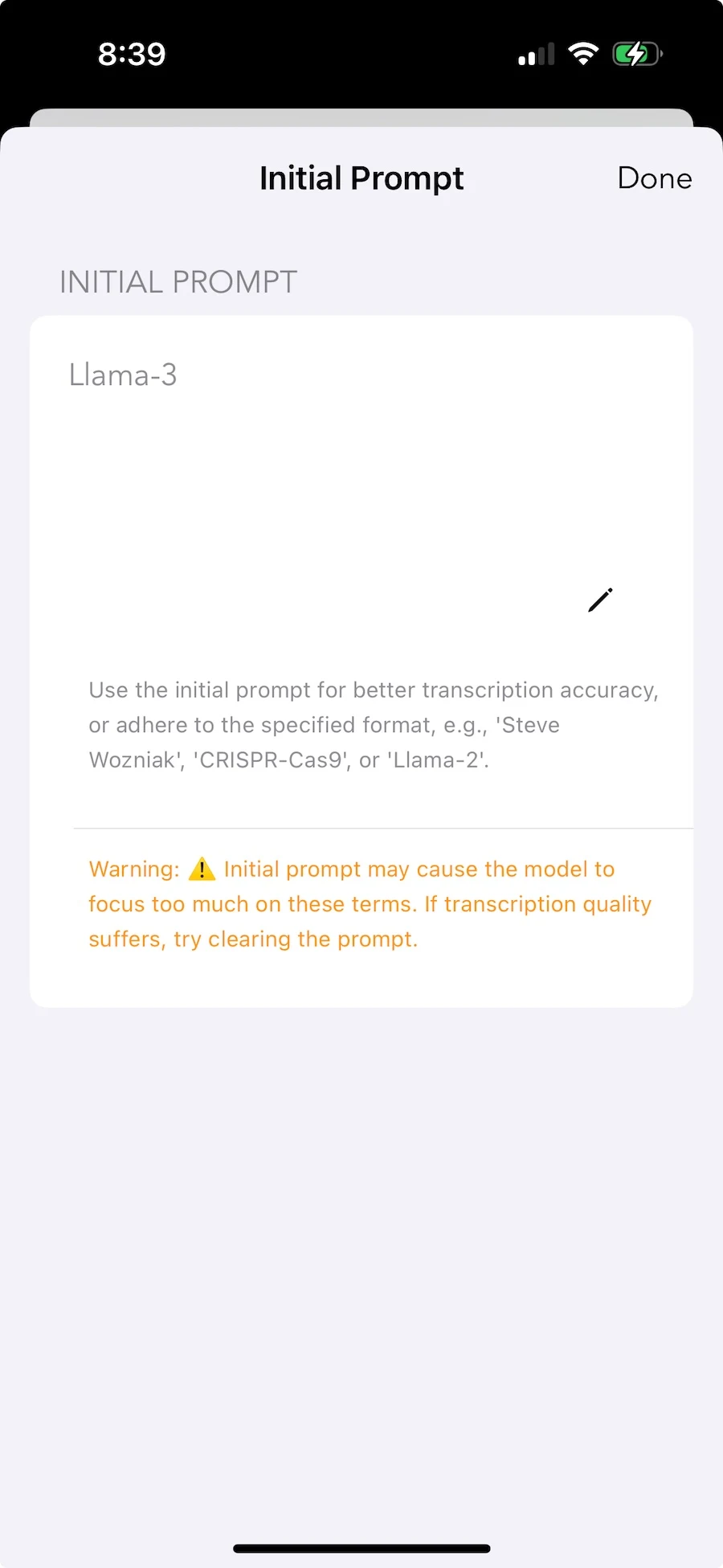
Local personalization. Your vocabulary stays private.
When Cloud Works Better
We're not pretending local transcription is universally better. Cloud has genuine advantages:
Real-time team collaboration. Five people editing a transcript simultaneously during a meeting requires server coordination. Local tools are single-user by nature.
Speaker identification at scale. On-device speaker labeling has landed — Whisper Notes now labels "who said what" entirely on-device on iPhone and Mac. Cloud-scale diarization still holds an edge for very large groups and heavily overlapping speech, but for typical meetings and interviews the accuracy gap has closed.
Workflow automation. Cloud services connect to CRMs, extract action items, send summaries to Slack. Local tools produce text files, and what happens next is up to you.
Older hardware. Pre-A14 iPhones and Intel Macs cannot run local inference practically. Cloud remains the only option.
If your primary need is team collaboration during live meetings, cloud tools are probably better. If you mainly transcribe your own recordings and privacy matters, local processing is a better fit.
The Trajectory
Each chip generation brings more Neural Engine performance. Each model iteration brings better efficiency. The gap between local and cloud narrows while privacy and latency advantages remain constant.
Cloud transcription made sense when your phone couldn't do the work. That era ended around 2022. What remains is inertia: subscriptions on autopay, workflows built around server assumptions, the vague belief that cloud must be better.
Local transcription works on Apple hardware now. The remaining reasons to pay a subscription are live captions and shared editing, and if neither is on your list, there is not a third one.
Technical Details
Device requirements: iOS 18 or later (iPhone 12 or newer recommended) or a Mac with Apple Silicon.
Models: Parakeet V3 for 25 European languages, SenseVoice Small for Chinese, Japanese, Korean, and Cantonese, and Whisper Large V3 Turbo for 100+ languages. Those three engine families run locally on Mac and iPhone; the Mac direct download adds a fourth from version 1.6.0, Qwen3-ASR 1.7B (Beta), for 30 languages.
Speed: Parakeet V3: 35 min audio in 18 seconds on M4 Pro. SenseVoice: 27 min Chinese podcast in 14 seconds. Whisper Turbo: 35 min in ~3 minutes.
Local AI on Mac: The DMG version can download Gemma 4 to summarize recordings, generate titles, and answer questions about a transcript without a cloud API.
Price: One App Store purchase includes iPhone/iPad and Mac App Store. The direct-download Mac DMG is sold separately and is free for 5,000 words a week.
Offline Speech to Text on Windows and Android
Whisper Notes is built for Apple Silicon, so it runs on Mac and iPhone only. On other platforms, the current options are:
Windows: Whisper Notes is Mac and iPhone only, so the best free options are Buzz (a simple GUI for Whisper) and faster-whisper (command line, several times faster than the reference implementation on the same hardware). Both run fully offline once the model is downloaded. Expect more setup friction than a native app — Python environments, model files, GPU drivers if you want speed.
Android: whisper.cpp has Android ports and a few wrapper apps, but quality and maintenance vary. There is no polished, mainstream offline transcription app on Android yet — see Whisper Notes for Android status for where things stand.
Many people searching for "Whisper Notes Windows" want the same offline, one-time-purchase model on a PC. We are not building one, and we would rather say that plainly than leave the question open (full explanation on the Whisper Notes for Windows page). Apple's Neural Engine is what makes 100x-realtime local transcription possible today.
Offline Speech Translation: What Local AI Can and Can't Do
A related question comes up often: can local AI translate speech, not just transcribe it? Partially. The original Whisper Large V3 model was trained on two tasks — transcription and any-language-to-English translation. Run locally, it can take French, Japanese, or Arabic audio and output English text, fully offline. Two caveats: it only translates into English (not the other direction), and this applies to the full Large V3 model — the faster Large-v3 Turbo variant dropped the translation task to specialize in transcription.
Offline speech translation is still early. There is no broadly adopted consumer app that matches cloud-style real-time speech-to-speech translation while staying fully offline. The practical workflow today is two steps: transcribe locally, then translate the resulting text with a tool you trust. The raw audio never has to leave your device.
Frequently Asked Questions
Can transcription be done without an internet connection?
Yes. Whisper Notes is offline transcription software that runs entirely on your device. Every AI model in the app processes audio locally — Parakeet V3, SenseVoice and Whisper in every version, plus Qwen3-ASR 1.7B (Beta) in the Mac direct download — using your Mac's Neural Engine or iPhone's A-series chip. No data is uploaded, no server is contacted. You can test this yourself by enabling airplane mode.
Does OpenAI Whisper work offline?
Yes. OpenAI released Whisper as an open-source model, which means it can run locally on your hardware. Whisper Notes packages Whisper Large V3 Turbo to run on Apple Silicon via CoreML/Metal — no Python, no command line, no internet required. It supports 100+ languages with offline speech recognition. For a deep dive into the model family, see our Whisper transcription guide.
Is Whisper Notes available for Windows or Android?
No, and we are not building one. Whisper Notes supports Mac (M-series) and iPhone (12+). For Windows, the alternatives are faster-whisper (command line) or Buzz (GUI wrapper); on Android, whisper.cpp-based apps. Whisper Notes' speed comes from Apple's Neural Engine, and neither Windows PCs nor Android phones have a single equivalent to build against.
Is there a free offline transcription app?
Whisper Notes offers 5,000 words a week free on Mac. After that, the Mac app is $14 one-time; the iPhone app is a separate $7.99 purchase. Neither platform has a subscription.
How does Whisper Notes compare to MacWhisper or faster-whisper?
MacWhisper is a Mac-only Whisper frontend. faster-whisper is a command-line tool. Whisper Notes includes Parakeet V3, SenseVoice, and Whisper on Mac and iPhone, plus Fn-key voice typing on the direct-download Mac DMG and lock-screen capture on iPhone. One App Store purchase includes iPhone/iPad and Mac App Store; the DMG is sold separately.
What is the best offline speech-to-text software?
It depends on your platform. On Mac and iPhone, Whisper Notes offers three local engines with one-time pricing; one App Store purchase includes iPhone/iPad and Mac App Store, while the direct-download DMG is free for 5,000 words a week and is sold separately. On Windows or Linux, Buzz (GUI) or faster-whisper (command line) are free and open source. Built-in dictation is enough for short notes, but it is not designed for long recordings.
Can I convert audio to text offline for free?
Yes. Whisper Notes for Mac has a free trial, and open-source tools like whisper.cpp, faster-whisper, and Buzz are completely free on every desktop platform. Free cloud services exist too, but they upload your audio — which defeats the point if privacy is why you searched for "offline".
Can I run Whisper as a local API with LocalAI?
Yes. LocalAI is an open-source, OpenAI-compatible API server that can serve whisper.cpp models, so you can self-host a drop-in replacement for cloud transcription endpoints on your own hardware. It's a good fit for developers building offline pipelines. If you want the same models without any server setup, Whisper Notes runs them as a native app on Mac and iPhone.
 Download for iOS