The Privacy of Voice: Why We Chose a Local Architecture
You don't have to compromise between convenience and control.
Voice Memos Are Different
Voice memos are often messy, unfiltered, and personal. They capture thoughts mid-formation—ideas before they are polished, frustrations before they are processed, observations before they are structured. That rawness is precisely what makes them valuable.
They feel different than a polished document. That feeling matters.
When you record a voice memo, you are often speaking to yourself. The intimacy of that moment—the half-finished sentences, the tangents, the unguarded honesty—deserves a certain respect in how it is handled technically.
A Question of Digital Hygiene
Your voice is a unique biometric identifier. Unlike a password, you cannot reset it. Unlike a credit card number, you cannot request a new one. This is not meant to alarm—it is simply a characteristic of voice data worth acknowledging.
For most casual recordings, cloud processing is perfectly fine. But for sensitive content—private reflections, professional notes, client conversations—keeping raw audio files off the cloud is simply good digital hygiene. It is the same principle as not storing passwords in plain text: not because disaster is imminent, but because thoughtful architecture prevents problems before they arise.
We built Whisper Notes around this principle. Your audio stays on your device—not because we think cloud services are dangerous, but because we believe you should have the choice.
The Architecture
Whisper Notes runs OpenAI's Whisper speech recognition model directly on your hardware. There is no server component. Your recordings are processed locally and never transmitted anywhere.
The implementation differs between platforms to optimize for each device's capabilities:
Mac: Whisper Large-v3 Turbo
On Mac, we run Whisper Large-v3 Turbo—a 1.5 billion parameter model optimized for Apple Silicon. This delivers accuracy comparable to cloud transcription services, with proper punctuation and intelligent paragraph formatting.
Processing speed scales with your chip: M4 machines achieve roughly 12x real-time, while M1 chips run at approximately 8x real-time.
iPhone: The Same Model Lineup, Mobile-Optimized
Mobile devices have different constraints—thermal limits, battery life, memory bandwidth. iPhone now runs the same model lineup as Mac—Parakeet V3, Whisper, and SenseVoice—each tuned for the Neural Engine in A-series and M-series chips.
While smaller than the Mac model, it delivers structured, punctuated text that consistently outperforms standard dictation. The trade-off is honest: for maximum accuracy on long recordings, process them on your Mac. For quick captures, the mobile model works well.
Designed for Speed
Good ideas do not wait. They arrive while driving, walking, or in the moments before sleep. The Lock Screen Widget is designed to minimize friction, getting you from thought to recording as fast as possible.
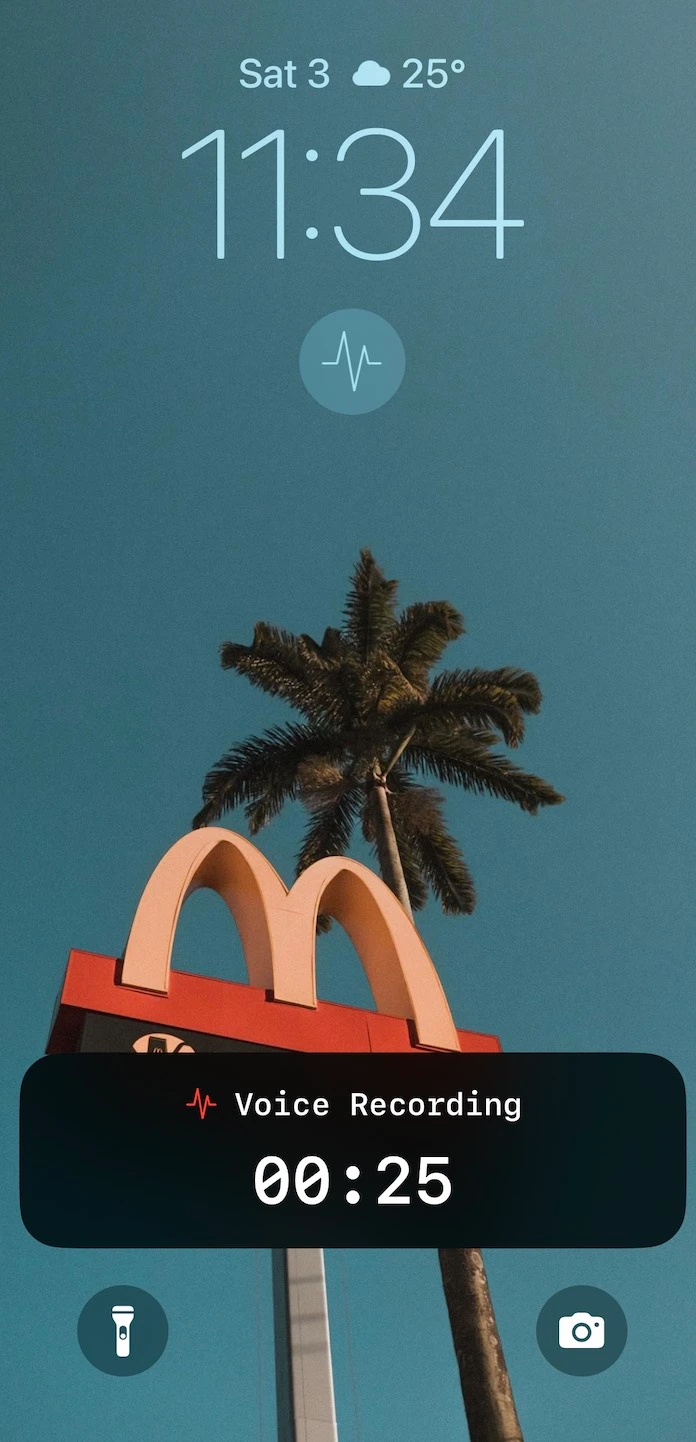
Lock Screen Widget with Live Activity
- • One-tap activation: Start recording directly from your lock screen
- • Live Activity: Visual confirmation of recording duration on the Dynamic Island
- • Face ID Integration: The widget works smoothly with Face ID authentication
- • Hands-free capable: Works with gloves, wet hands, or AirPods tap gestures
The Capture-Review Workflow
The most effective voice memo workflow separates capture from review. Mobile devices excel at quick recording; desktop environments excel at deep editing.
iPhone: Capture
Use iPhone for capturing thoughts when they strike. The Lock Screen Widget reduces friction to a single tap. The mobile model transcribes immediately, giving you usable text right away.
Mac: Review
On Mac, Whisper Notes provides tools for deeper work:
- • Large-v3 Turbo processing: Re-transcribe recordings with maximum accuracy
- • Timestamped paragraphs: Click any paragraph to jump to that moment in the audio
- • Synchronized playback: Text highlights as audio plays
- • Export flexibility: Plain text, timestamped format, or SRT subtitles
- • System-wide dictation: Hold Fn to dictate directly into any app
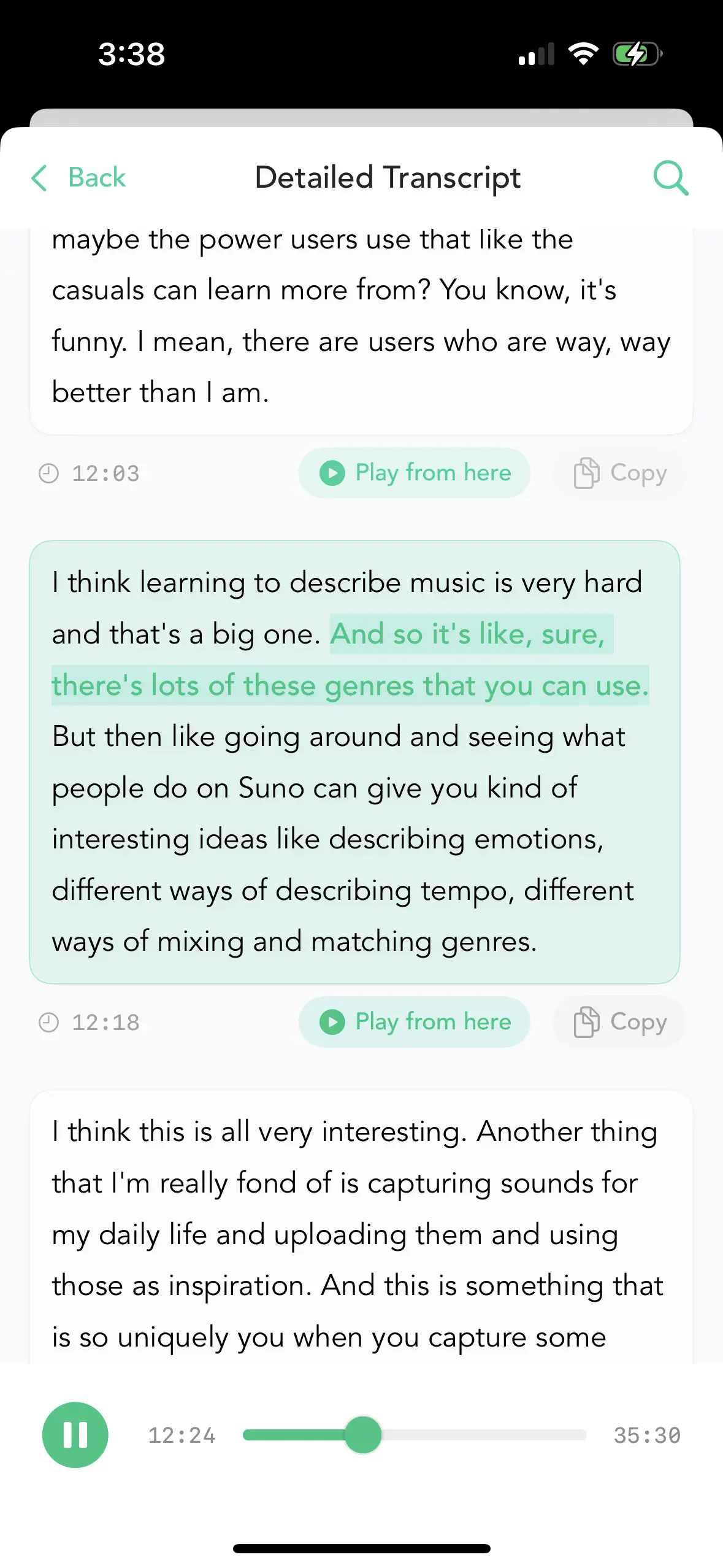
Timestamped transcript with synchronized audio playback
The Peace of Mind Benefit
The real benefit is not just technical security—it is psychological.
Knowing your audio never leaves your device gives you the freedom to speak completely freely, without self-censorship. You can record half-formed thoughts, vent frustrations, brainstorm wild ideas, or document sensitive professional matters—all without wondering who else might eventually have access to that audio.
This is the same reason some people prefer writing in a physical notebook: not because digital notes are insecure, but because the sense of privacy changes how freely you think.
The Economic Model
Since all processing happens on your device, there are no server costs that scale with usage. This enables a one-time purchase model: $6.99 on iPhone, free trial on Mac—no subscriptions, permanently.
No subscriptions. No per-minute charges. No usage limits.
Whisper Notes vs. Whisper Memos: Not the Same App
A clarification worth making, because the names are easy to confuse: Whisper Memos is a different product from a different developer. Both build on OpenAI's Whisper, but the architectures are opposites. Whisper Memos' own privacy policy explains that transcription "entails transmitting your audio file to OpenAI" — recordings are sent to cloud APIs for processing. Whisper Notes has no server component: your audio is recorded, transcribed, and stored on your device only.
| Whisper Notes | Whisper Memos | |
|---|---|---|
| Where audio is processed | 100% on-device | Cloud — audio is transmitted to OpenAI's Whisper API |
| Pricing model | One-time: $6.99 on iPhone; free trial on Mac, then $6.99 (separate purchase) | Subscription: $10/month, or $60/year billed annually |
| Platforms | iPhone and Mac (Apple Silicon) | iPhone and Apple Watch |
| Works offline | Yes — no internet needed, ever | No — transcription requires a connection to cloud services |
To be fair to both: if what you want is Apple Watch recording with transcripts delivered to your email, Whisper Memos is a purpose-built cloud tool for exactly that — but if your priority is that your audio never leaves your device, only local processing can guarantee it.
The Trade-offs
Local processing involves real trade-offs worth understanding:
Considerations
- • Processing speed: On-device inference is slower than cloud APIs. A 10-minute recording takes 1-2 minutes to process on iPhone 15. Cloud services return in seconds.
- • Accuracy ceiling: Whisper achieves 95%+ accuracy on clear speech. Heavy accents or loud background noise may require some editing.
- • Platform: Apple Silicon only—Mac M1 or newer, iPhone 12 or newer (iOS 15+). No Android or Windows.
- • Post-recording transcription: Whisper Notes transcribes after recording, not during. This produces more accurate results.
When This Approach Fits
Whisper Notes works well for:
- • Privacy-conscious professionals: Legal, medical, journalism, therapy
- • Personal reflection: Journaling, idea capture, processing thoughts
- • Offline environments: Airplanes, secure facilities, unreliable connectivity
- • Subscription-fatigued users: One payment, permanent access
When to Consider Alternatives
Cloud services may be better if you need:
- • Real-time transcription shared with a team
- • Instant processing for very long recordings
- • Android or Windows support
Summary
Whisper Notes is built on a simple premise: voice memos are personal, and you should have control over where that audio lives. We chose a local-first architecture not because cloud services are bad, but because some content deserves to stay on your device.
Whisper Large-v3 Turbo on Mac for accuracy. A mobile-optimized model on iPhone for quick capture. Both platforms process entirely offline.
$6.99 on iPhone. Free trial on Mac. Your audio stays yours.
Frequently Asked Questions
What is the most private voice memo app?
One that never uploads your audio. Whisper Notes records and transcribes voice memos entirely on your device using OpenAI's Whisper model — there is no server component, so your recordings are processed locally and never transmitted anywhere.
Can I transcribe voice memos without an internet connection?
Yes. Whisper Notes processes everything locally on both Mac and iPhone — with Parakeet V3, Whisper, and SenseVoice models running on-device — so it works on airplanes, in secure facilities, and anywhere with unreliable connectivity.
Does the iOS 18 Voice Memos transcription work offline?
Yes. Apple's built-in Voice Memos transcription (iOS 18 and later) also runs on-device, so it works without internet. The differences are scope and control: Whisper Notes additionally lets you import any audio file, supports 100+ languages via Whisper, offers SenseVoice for fast Chinese, Japanese, and Korean transcription, and works on older iOS versions (iPhone 12 or newer, iOS 15+).
Why is voice data more sensitive than text?
Your voice is a unique biometric identifier. Unlike a password, you cannot reset it, and unlike a credit card number, you cannot request a new one — so keeping raw audio files off the cloud is simply good digital hygiene.
Does Whisper Notes require a subscription?
No. It's a one-time purchase: $6.99 on iPhone, and a free trial on Mac (iOS and Mac are separate purchases). Because all processing happens on your device, there are no server costs — and no per-minute charges or usage limits.
 Download for iOS