
We built offline meeting transcription for Mac. It records Zoom, Teams, and Google Meet calls, transcribes them locally with Parakeet V3, and summarizes them with Gemma 4. No cloud, no bot in the call. $6.99 once.
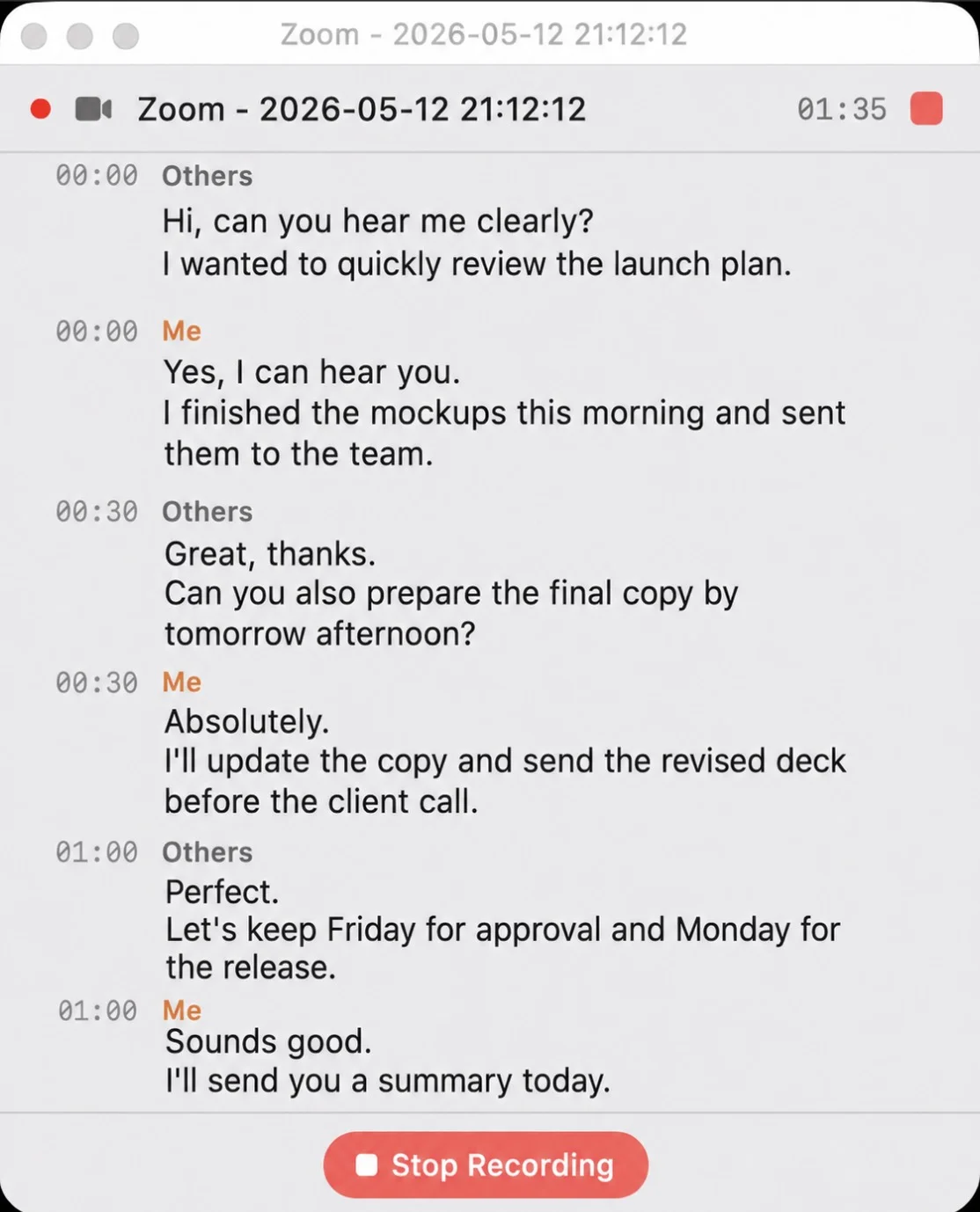
Recording a Zoom call in Whisper Notes — "Me" and "Others" are labeled by audio source
A Typical Monday
10 AM, Zoom call with a client. You open Whisper Notes, click record. The app captures system audio and your microphone simultaneously — nobody in the meeting sees a bot, nobody gets a notification, nothing shows up in the participant list.
An hour later, the call ends. You stop recording. Parakeet V3 transcribes 60 minutes of audio in about a minute, entirely on your Mac's Neural Engine. You tap Summarize — Gemma 4 extracts the key points. You tap Action Items — it pulls out every task and deadline mentioned. You send the meeting notes to the client. The audio never left your machine.
That's the whole workflow. Record, transcribe, summarize. All local.
What It Does
Recording
Whisper Notes captures system audio — the sound coming out of your speakers or headphones. If you can hear it on your Mac, we can transcribe it. Zoom, Teams, Google Meet, Webex, GoTo, Whereby, Jitsi, YouTube, podcasts, or any other app. It also records your microphone at the same time, so both sides of the conversation are captured.
No bot joins the call. This matters more than it sounds. If you've ever seen "Otter.ai Notetaker has joined the meeting" pop up in a Zoom call, you know what happens next — someone asks what it is, someone else gets uncomfortable, and the conversation shifts. With system audio capture, nobody knows you're recording except you.
Transcription
Parakeet V3 runs on Apple Silicon via CoreML. It processes English and 24 European languages at roughly 60× real-time — a 60-minute meeting finishes in about a minute. For Chinese, Japanese, or Korean, SenseVoice handles CJK at 52× speed. Pyannote VAD strips silence before transcription, so the model only processes actual speech.
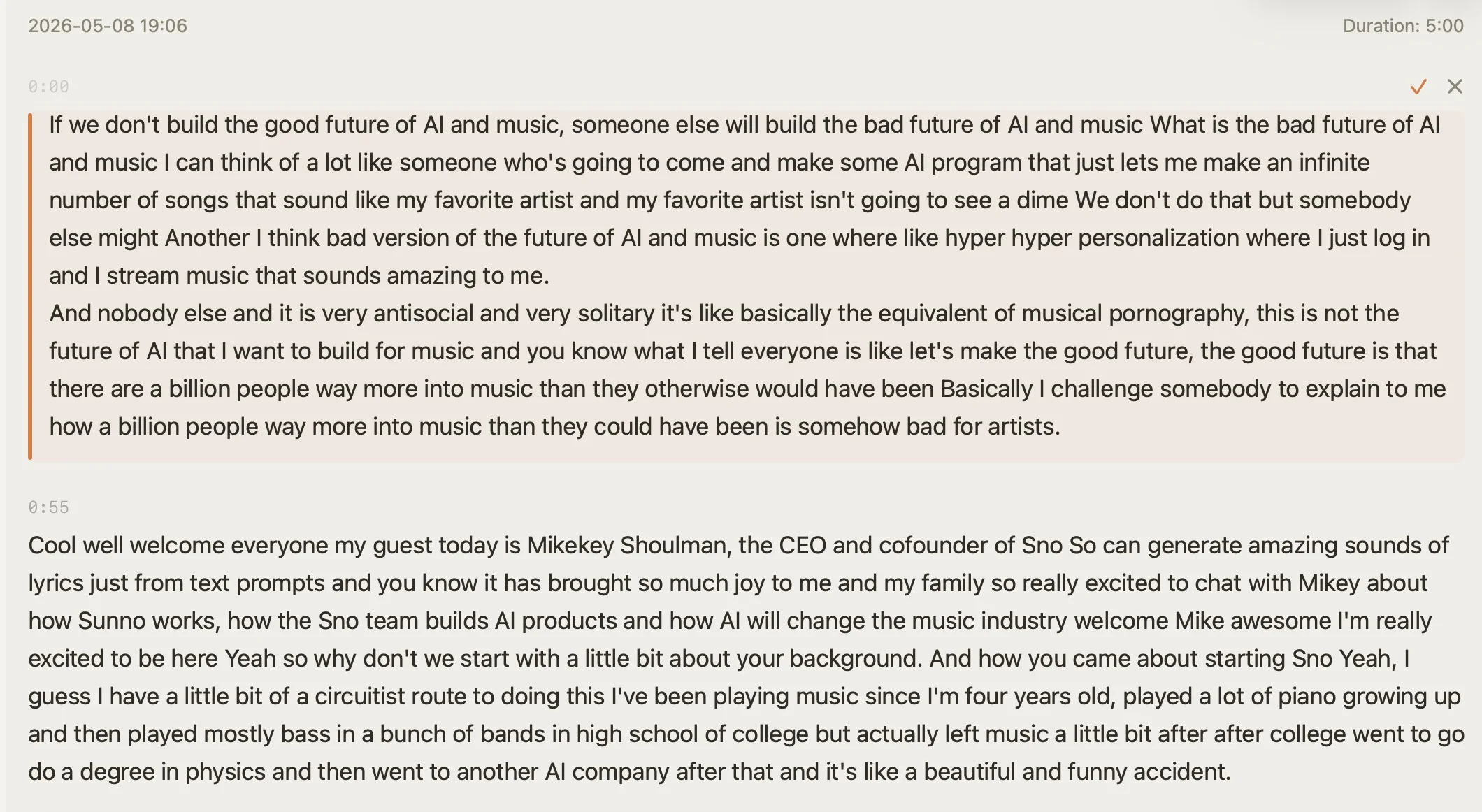
Transcript with timestamps and inline editing — click any segment to jump to that moment in the audio
AI Features — All Local
Gemma 4 runs on your Mac. No API key, no cloud call, no usage limits. After transcription:
- •Summarize — main points of a 60-minute meeting, in seconds
- •Action Items — tasks and deadlines, extracted automatically
- •Translate — Apple Intelligence translates the transcript into another language
- •Chat — ask "what did we agree on pricing?" and get an answer grounded in the transcript
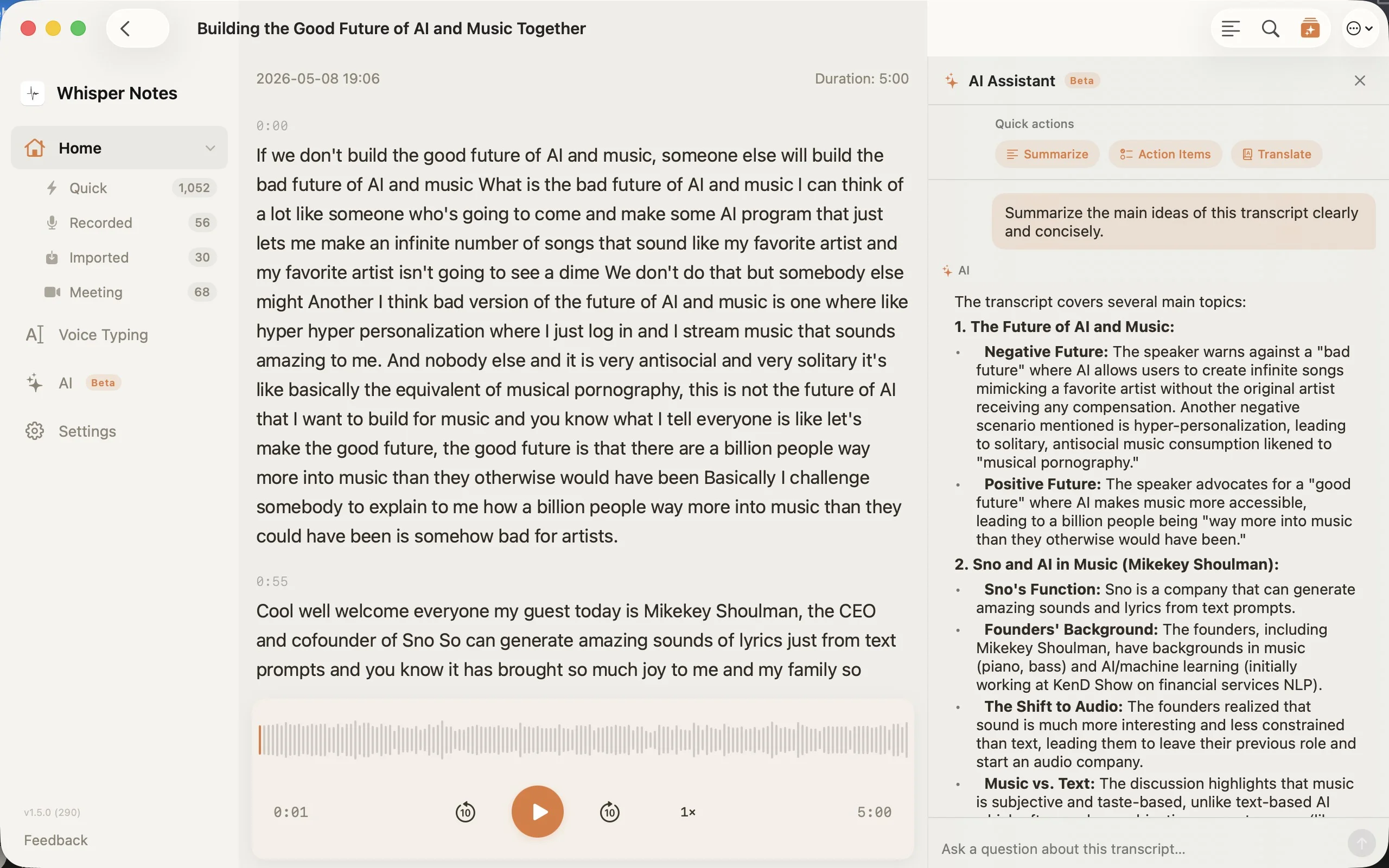
Gemma 4 AI sidebar — Summarize, Action Items, Translate, and free-form chat, all running locally
How Fast Is Offline Meeting Transcription?
Parakeet V3 processes audio at roughly 60× real-time on Apple Silicon, so transcription time scales with recording length — about one second of processing per minute of meeting:
| Recording length | Approx. processing time (Parakeet V3) |
|---|---|
| 30-minute meeting | ~30 seconds |
| 60-minute meeting | ~1 minute |
| 2-hour recording | ~2 minutes |
In practice, that means your notes are ready seconds after the call ends — stop the recording, and by the time you've switched back to your inbox, the transcript is done. Exact times vary with your Mac's chip and how much of the recording is actual speech, since Pyannote VAD strips silence before transcription even begins.
Why We Built It This Way
Meeting audio is some of the most sensitive data a company produces. Client negotiations, HR reviews, board discussions, legal consultations — the kind of conversations where the wrong leak ends careers.
Most transcription tools upload this audio to cloud servers, process it there, and store it under their data retention policies. Some add a bot to the call that everyone can see. Some keep your recordings indefinitely for "model improvement."
We took a different approach: everything runs on your Mac. The ASR model, the LLM, the audio storage — all local. There's no server to breach, no data retention policy to read, no third-party subpoena risk. For teams under GDPR, HIPAA, or attorney-client privilege, this architecture is the point.
How It Compares
| Whisper Notes | Otter.ai | Fireflies | Jamie | |
|---|---|---|---|---|
| Processing | 100% on-device | Cloud | Cloud | Hybrid |
| Bot in call | No | Yes | Yes | No |
| Price | $6.99 once | $16.99/mo (Pro) | from $18/mo | $24/mo |
| Works offline | Yes | No | No | Partial |
| AI summary | Local (Gemma 4) | Cloud | Cloud | Cloud |
| Speaker diarization | Not yet | Yes | Yes | Yes |
Different Meetings, Different Languages
Pick the model that matches your meeting language:
| English / European | Parakeet V3 — ~60× real-time, 6.32% WER, zero hallucinations on silence |
| Chinese / Japanese / Korean | SenseVoice — 52× speed, handles Cantonese, GPU-accelerated via MLX |
| Other languages | Whisper Large V3 Turbo — 99 languages, high accuracy, slower |
What's Missing
We don't have speaker diarization yet. Right now, Whisper Notes labels audio as "Me" (your microphone) and "Others" (system audio) — which covers most one-on-one and small group meetings. But for a 10-person call where you need to know who said what, that's not enough.
It's the obvious next step and we're working on it. The goal is local diarization that runs alongside Parakeet V3 and SenseVoice, without sending audio anywhere.
Frequently Asked Questions
How do I transcribe a meeting recording on Mac without uploading it?
Use Whisper Notes for Mac. It records system audio and your microphone, then transcribes locally with Parakeet V3 on your Mac's Neural Engine — a 60-minute meeting finishes in about a minute, and the audio never leaves your machine.
Can I record and transcribe Zoom or Teams meetings offline, without a bot joining the call?
Yes. Whisper Notes captures system audio directly, so no bot joins the meeting and nothing shows up in the participant list. It works with Zoom, Teams, Google Meet, Webex, and any other app you can hear on your Mac.
Does Whisper Notes tell me who said what in a meeting?
Partially. It labels audio as "Me" (your microphone) and "Others" (system audio), which covers most one-on-one and small group meetings. Full speaker diarization isn't available yet — it's the next step we're working on.
Does Whisper Notes transcribe meetings in real time?
No — there are no live captions. Whisper Notes records during the call and transcribes locally right after it ends: with Parakeet V3, a 60-minute meeting becomes text in about a minute. If you need live captions during the call, a cloud tool like Otter.ai fits better.
Can I get an AI summary of a meeting without sending the transcript to the cloud?
Yes. Gemma 4 runs locally on your Mac — it summarizes the meeting, extracts action items and deadlines, translates the transcript, and answers questions about it. No API key, no cloud call, no usage limits.
 Download for iOS