
Whisper Notes records Zoom, Teams, and Google Meet audio on Mac, transcribes it locally with Parakeet V3, and can summarize the transcript with on-device Gemma 4 in the Direct Download version. No meeting bot joins the call. The Mac app is free for 5,000 words a week, then costs $14 once.
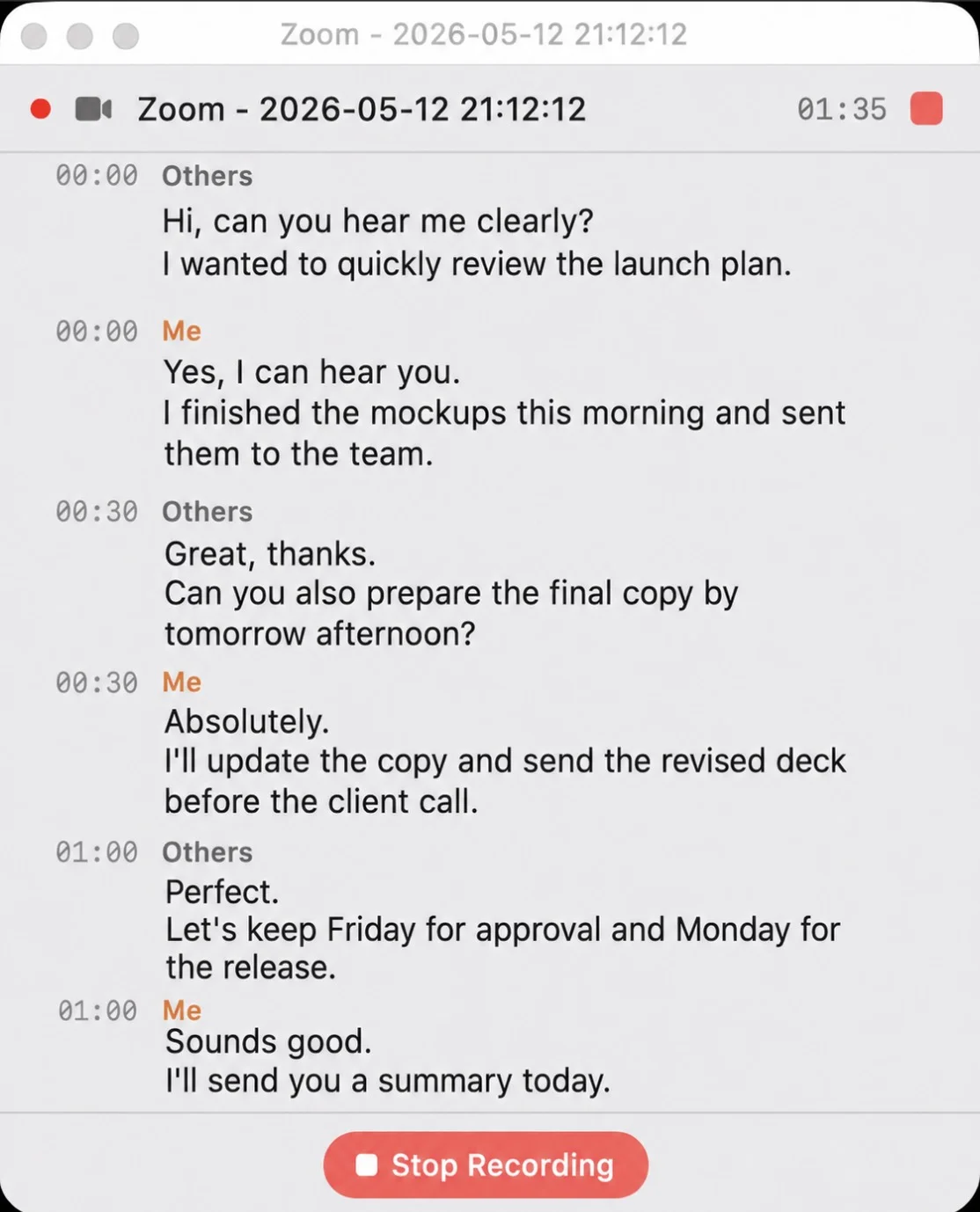
Recording a Zoom call in Whisper Notes for on-device transcription
A Typical Monday
10 AM, Zoom call with a client. Whisper Notes captures the meeting audio and your microphone without adding a bot to the participant list. The app cannot decide whether recording is appropriate for you: tell participants and obtain any consent required by your organization and local law.
When the call ends, Parakeet V3 transcribes the recording on your Mac. In our M4 Pro test it ran at 103× realtime, against 14.3× for Whisper Large V3 Turbo on the same machine; your time will vary by Mac, audio, and model. In the Direct Download version, Gemma 4 can then summarize the transcript or extract action items without sending it to an API.
The workflow is simple: record, transcribe, review, and summarize. The recording, speech recognition, and Gemma processing stay on the Mac.
What It Does
Recording
Whisper Notes captures the meeting audio and your microphone at the same time, so both sides of a Zoom, Teams, or Google Meet conversation are included. The public Direct Download build can detect those meeting apps automatically; you can review the recording before you keep or share the transcript.
Unlike a meeting bot, Whisper Notes does not appear as another participant. That is a workflow difference, not permission to record silently: notification and consent requirements vary by company, country, and state.
Transcription
Parakeet V3 runs on Apple Silicon through CoreML and supports 25 European languages. For Chinese, Japanese, Korean, and Cantonese, SenseVoice runs through MLX. Pyannote VAD removes silent regions before transcription. Performance depends on the Mac, model, audio length, and amount of speech.
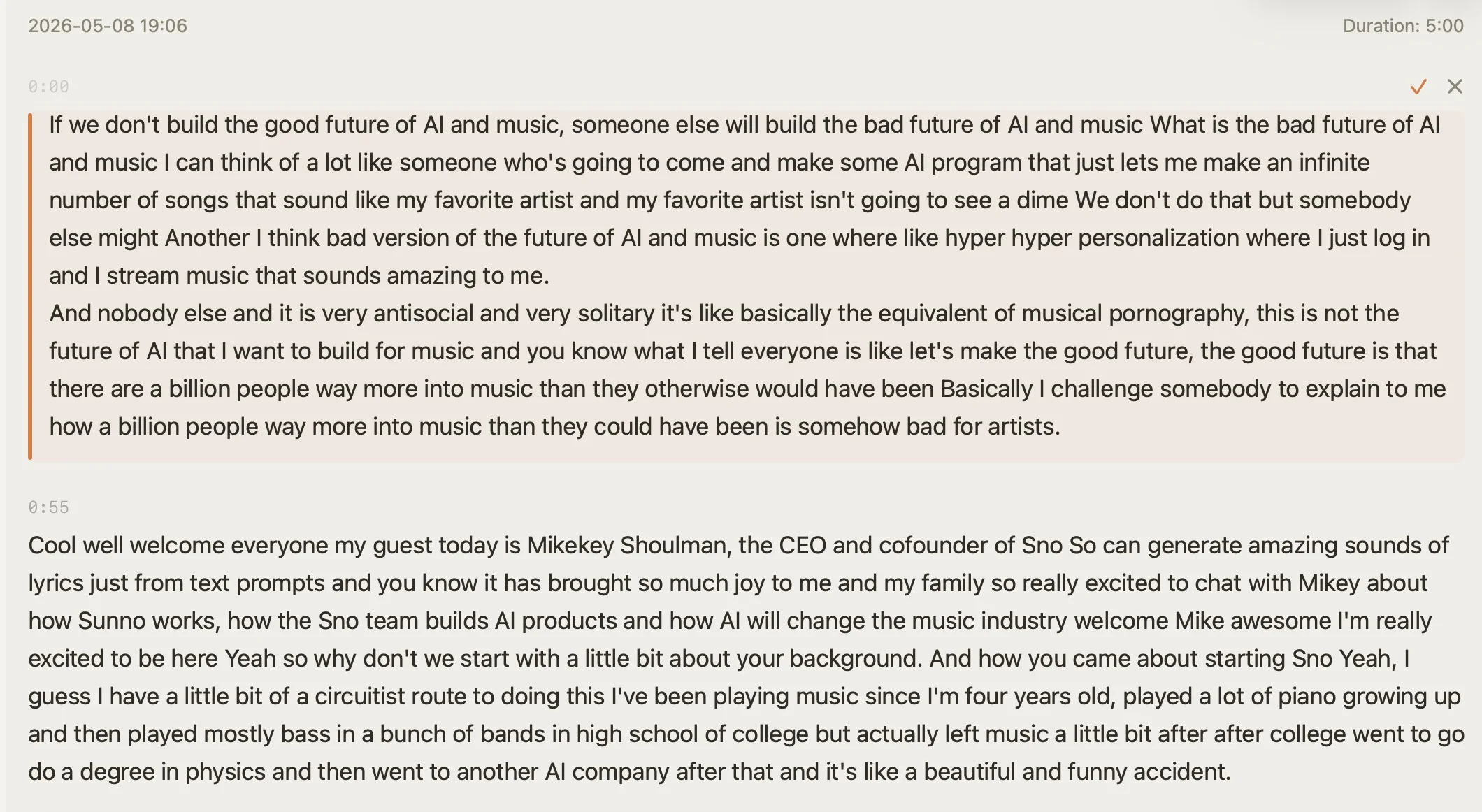
Transcript with timestamps and inline editing — click any segment to jump to that moment in the audio
Speaker Labels: Who Said What
Whisper Notes now identifies speakers. Run speaker identification on a meeting recording and every paragraph gets a label — Speaker 1, Speaker 2 — with its timestamp. Rename a speaker once and the label updates through the whole transcript; SRT and VTT exports keep the names.
Like the rest of the workflow, speaker identification runs entirely on-device, and it ships on iPhone (1.8.5+), in the current Mac App Store version, and in the Direct Download version (1.5.1+). Two or three clearly distinct voices — a client call, an interview — work best; if voices sound similar, set the speaker count (2–6) manually. Benchmarks, hard cases, and honest limits are in the announcement: Whisper Notes Now Identifies Speakers.
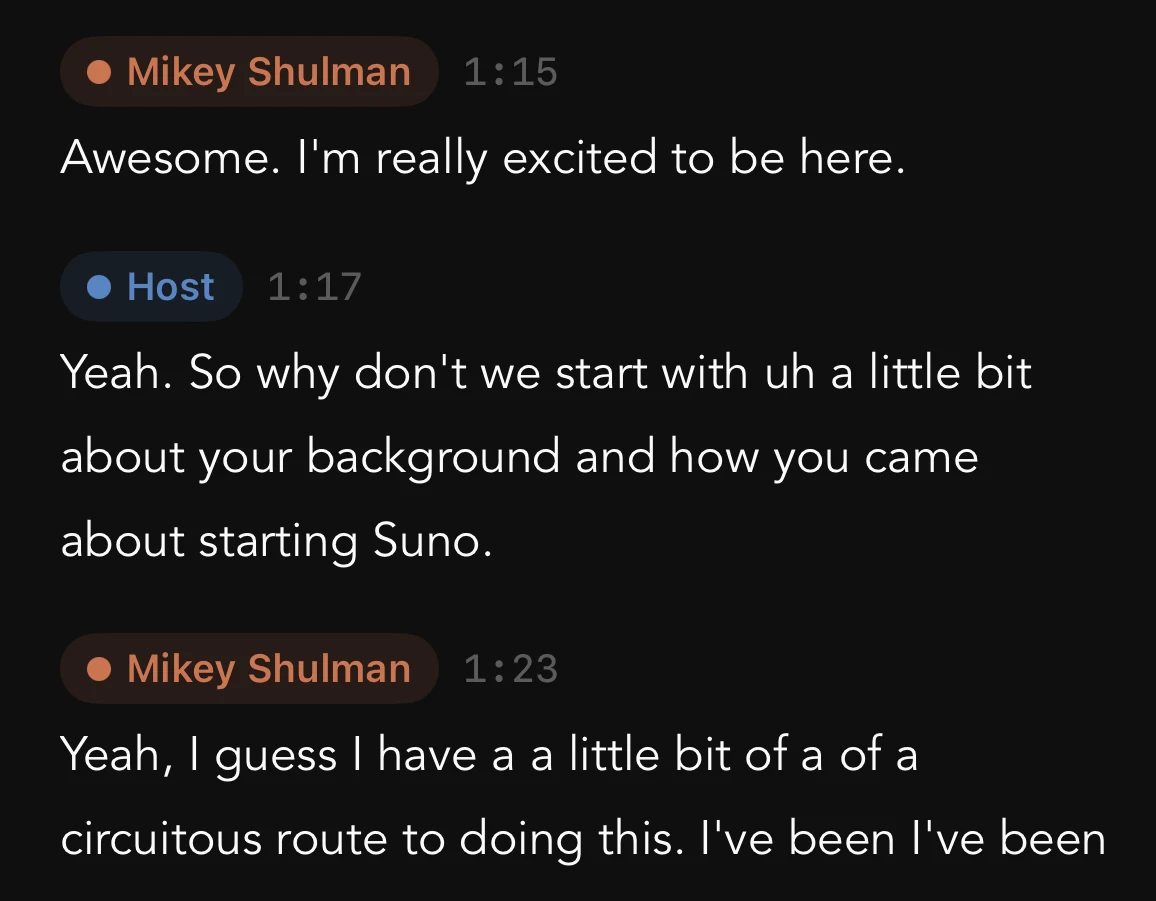
Speaker labels on a two-person recording — the detected speakers renamed to real names
Post-Transcript Tools on Mac
In the Direct Download version, Gemma 4 runs on your Mac with no API key or cloud call. After transcription:
- •Summarize — condense the reviewed transcript into key points
- •Action Items — identify candidate tasks and deadlines for you to verify
- •Translate — translate the transcript on supported Macs
- •Chat — ask "what did we agree on pricing?" and get an answer grounded in the transcript
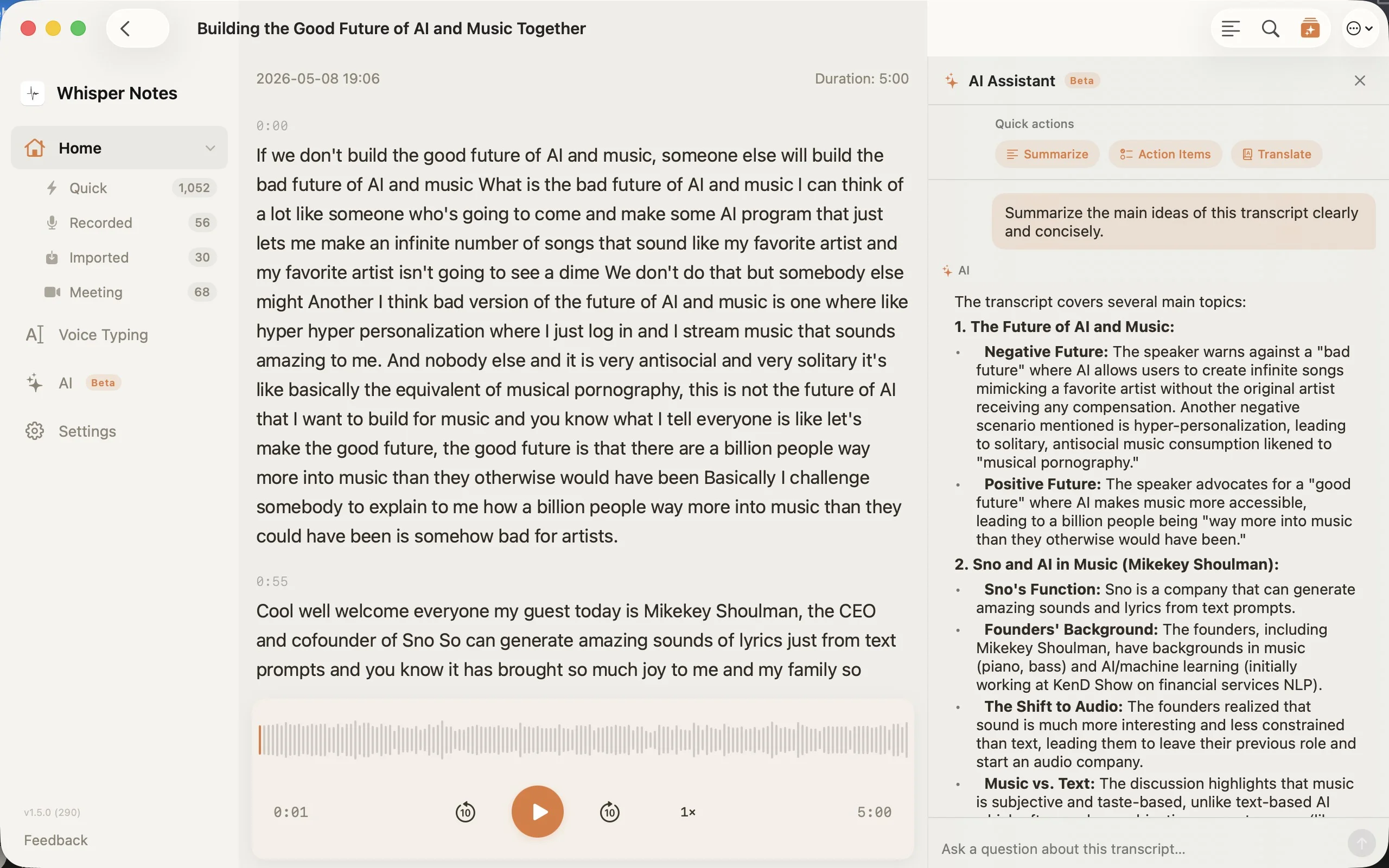
The Direct Download version's post-transcript tools: Summarize, Action Items, Translate, and chat
How Fast Is Offline Meeting Transcription?
Use measured results as a reference, not a promise. We ran the same English file through two models on an M4 Pro:
| Model | Realtime factor on M4 Pro |
|---|---|
| Parakeet V3 | 103× |
| Whisper Large V3 Turbo | 14.3× |
The comparison uses one file on one Mac. A longer meeting does not always scale perfectly, and exact times vary with your chip, selected model, language, audio quality, and how much silence Pyannote removes. The Parakeet V3 article linked above contains the full methodology and model comparison.
Why We Built It This Way
Meeting audio can contain sensitive client negotiations, HR reviews, board discussions, or legal consultations. Where that data is processed and stored deserves the same scrutiny as any other confidential record.
Cloud meeting assistants send audio or transcripts to vendor infrastructure and handle them under the vendor's retention and data-processing policies. That can be useful for live collaboration, but it also adds another system for your team to review.
Whisper Notes keeps the recording, speech model, transcript, and Gemma processing on the Mac. That reduces third-party data transfer, but it does not make a workflow automatically compliant with GDPR, HIPAA, privilege rules, or company policy. You still need appropriate consent, access controls, retention rules, and device security.
How It Compares
| Whisper Notes | Typical cloud meeting assistant | |
|---|---|---|
| Processing | 100% on-device | Vendor infrastructure |
| Bot in call | No | Often a bot, browser extension, or calendar integration |
| Price | 5,000 words/week free, then $14 once | Usually a free tier and/or subscription |
| Works offline | Yes | Usually requires internet |
| AI summary | Local Gemma 4 in the Direct Download version | Processed by the provider |
Different Meetings, Different Languages
Pick the model that matches your meeting language:
| English / European | Parakeet V3 — 25 European languages; 103× realtime in our M4 Pro test; 6.32% English WER on the Open ASR Leaderboard |
| Chinese / Japanese / Korean | SenseVoice — Chinese, Japanese, Korean, and Cantonese; 27 minutes of Chinese in 13.83 seconds in our M4 Pro test |
| Other languages | Whisper Large V3 Turbo — 100+ languages and the broadest language coverage of the three |
Where This Workflow Fits — and Where It Doesn't
Whisper Notes fits meetings where you want a private recording and a reviewed transcript after the call. It does not provide live captions during the meeting or a shared cloud workspace where several teammates edit the same transcript at once.
If real-time captions, automatic distribution to a large team, or simultaneous collaborative editing matters more than local processing, a cloud meeting platform may fit better. If the recording should remain on one Mac, the local workflow is the advantage.
If you want to drive this from a script or your own tools, the Direct Download version ships a local CLI and MCP server — see the CLI and MCP guide.
Frequently Asked Questions
How do I transcribe a meeting recording on Mac without uploading it?
Use Whisper Notes for Mac. It records the meeting audio and your microphone, then transcribes locally. In our M4 Pro benchmark, Parakeet V3 ran at 103× realtime; your result will vary with the Mac, model, language, and recording.
Can I record and transcribe Zoom or Teams meetings offline, without a bot joining the call?
Yes. Whisper Notes captures the meeting audio on the Mac, so it does not add a bot to the participant list. The public build automatically detects Zoom, Teams, and Google Meet. Tell participants and obtain any consent required by your organization and local law.
What should I check before recording a meeting?
Confirm that recording is allowed by your organization and the laws that apply to every participant. Tell attendees, obtain the required consent, protect the local file, and delete it according to your retention policy. On-device processing reduces third-party transfer; it does not replace those responsibilities.
Does Whisper Notes transcribe meetings in real time?
No. Whisper Notes records during the call and transcribes locally after the recording ends. If you need live captions during the meeting, use a tool designed for real-time captioning.
Can I get an AI summary of a meeting without sending the transcript to the cloud?
Yes, in the Direct Download version. Gemma 4 runs locally on the Mac to summarize the reviewed transcript, suggest action items, and answer questions about it. No API key or cloud call is required; verify the generated summary and tasks against the transcript.
Can Whisper Notes show who said what in a meeting?
Yes. On-device speaker identification labels every paragraph by speaker on iPhone (1.8.5+), in the current Mac App Store version, and in the Direct Download version (1.5.1+). Rename a speaker once and the whole transcript updates; SRT and VTT exports keep the names. If voices sound similar, set the speaker count (2–6) manually.
 Download for iOS