Since macOS 26 and iOS 26, Apple has shipped a new generation of on-device speech recognition — SpeechAnalyzer and SpeechTranscriber, Apple Speech for short below. It is markedly more accurate than the old dictation engine. What we wanted to know is how it compares in real use with the on-device open models people download — Whisper, Parakeet, Qwen3-ASR and SenseVoice: is Apple's built-in speech recognition good enough now that you could skip a transcription app entirely?
How much better than the dictation you already had?
Until now a Mac's speech recognition was the SFSpeechRecognizer-era engine, the one system dictation still uses today (DictationTranscriber). What macOS 26 and iOS 26 add is the SpeechAnalyzer API and its SpeechTranscriber module. We ran both on the FLEURS test split, about 150 sentences and 30 minutes per language, on the same Mac.
| Language | Apple Dictation | Apple Speech |
|---|---|---|
| Korean | 7.11 | 4.31 |
| Italian | 6.93 | 4.39 |
| Spanish (Latin America) | 8.43 | 5.41 |
| German | 12.69 | 6.26 |
| Japanese | 9.37 | 6.36 |
| French | 17.10 | 7.61 |
| Chinese | 10.28 | 7.97 |
| Cantonese | 10.18 | 8.69 |
| English | 13.83 | 8.80 |
| Portuguese (Brazil) | 10.85 | 9.35 |
Every language both Apple engines measured cleanly, ordered by Apple Speech's error rate; green marks the better value in the row. Same run, same clips, same Mac. CER for Japanese, Korean, Chinese and Cantonese, WER for the rest.
Apple Speech is more accurate on all ten languages both engines measured cleanly. French and German lose more than half their errors, the median language about a third, Brazilian Portuguese and Cantonese about one error in seven.
Dictation still reaches more languages. Apple Speech returned results for 21 of the 83 language configurations in this run, dictation for 33, including the three the new engine is missing here: Dutch, Polish and Russian, at 17.34, 13.50 and 13.13. There is no fixed list to quote either. The language assets belong to macOS, so an app asks at runtime what a given machine has.
So can you skip the downloaded models?
Six engines, the same clips, one Mac. The ten languages below are ten of the most-used ones, in a fixed order that has nothing to do with the scores.
| Language | Apple Speech | Qwen3-ASR | Whisper Large | Whisper Small | Parakeet | SenseVoice |
|---|---|---|---|---|---|---|
| English | 8.80 | 4.49 | 5.49 | 7.04 | 6.89 | 8.46 |
| German | 6.26 | 2.85 | 4.05 | 8.67 | 6.26 | — |
| Dutch | — | 7.36 | 5.69 | 16.75 | 8.58 | — |
| Russian | — | 5.65 | 5.13 | 11.37 | 7.12 | — |
| Polish | — | 12.59 | 5.45 | 15.81 | 8.30 | — |
| Japanese | 6.36 | 5.74 | 5.30 | 11.37 | — | 6.78 |
| Korean | 4.31 | 3.54 | 4.25 | 7.30 | — | 7.85 |
| French | 7.61 | 4.57 | 5.97 | 13.24 | 5.83 | — |
| Chinese | 7.97 | 6.49 | 7.97 | 20.50 | — | 7.69 |
| Spanish (Latin America) | 5.41 | 3.38 | 3.62 | 6.22 | 4.86 | — |
Ten of the most-used languages, one engine per column. Each cell is that engine's error rate, lower is better; green marks the lowest in the row, white the second-lowest. CER for Japanese, Korean and Chinese, WER for the rest, never merged into one number. Our own FLEURS run, by the Whisper Notes team, on one M5 MacBook Air, read speech.
Short names: Qwen3-ASR = Qwen3-ASR 1.7B, Whisper Large = Whisper Large V3 Turbo, Parakeet = Parakeet V3, SenseVoice = SenseVoice Small. A dash means the engine has no model for that language.
Qwen3-ASR 1.7B has the lowest error rate in six of the ten languages, Whisper Large V3 Turbo in the other four, Apple Speech in none. It comes closest on Korean, 0.77 behind the row leader, then Japanese at 1.06 and Chinese at 1.48, where it is level with Whisper Large V3 Turbo at 7.97. It is furthest behind on English, 8.80 (Apple Speech) against 4.49 (Qwen3-ASR 1.7B), and Dutch, Polish and Russian have no Apple Speech result at all.
Against Whisper Small, Apple Speech was more accurate on eight of the ten languages both measured cleanly. The two it lost are English, 8.80 (Apple Speech) against 7.04 (Whisper Small), and Brazilian Portuguese, 9.35 against 8.61.
A benchmark published in July measured Apple Speech on English against Whisper Small and put Apple ahead. Which Whisper is in the comparison matters, and so do the clips. That run used LibriSpeech, audiobook narrators reading aloud; ours is FLEURS, many different speakers reading Wikipedia sentences. Our run shows the gap on English and cannot say what causes it.
Against Whisper Large V3 Turbo the order reverses. Apple Speech trails on eight of those ten languages, ties Chinese at 7.97, and leads only Cantonese, 8.69 (Apple Speech) against 36.75 (Whisper Large V3 Turbo) — see the Cantonese row below. OpenAI's release notes for Turbo name Cantonese among the languages where the model degrades most, so 36.75 is a known weakness of Whisper rather than a quirk of our run.
On Korean, Apple Speech gets about one character in 23 wrong. The most accurate model in this run, Qwen3-ASR 1.7B, gets about one in 28: 4.31 (Apple Speech) against 3.54 (Qwen3-ASR 1.7B).
Parakeet V3 downloads 465 MB and is more accurate on every European language both cover: 6.89 (Parakeet V3) against 8.80 (Apple Speech) on English, 5.83 against 7.61 on French, 4.86 against 5.41 on Spanish, 3.43 against 4.39 on Italian and 6.49 against 9.35 on Brazilian Portuguese, and the two are level on German at 6.26. It has no Japanese, Korean, Chinese or Cantonese, which is where Apple Speech is the one of the two that exists.
The six rows Qwen3-ASR 1.7B leads include English, German, French and Spanish.
SenseVoice Small is the fastest engine here at 162.3x realtime, and on Chinese and English it and Apple Speech are level: 7.69 (SenseVoice Small) against 7.97 (Apple Speech), and 8.46 against 8.80. On Korean it is far behind, 7.85 (SenseVoice Small) against 4.31 (Apple Speech).
Size and speed
| Engine | Speed | Peak memory | Download |
|---|---|---|---|
| SenseVoice Small | 162.3x realtime | 0.95 GiB | 827 MB |
| Parakeet V3 | 75.6x realtime | 0.09 GiB | 465 MB |
| Apple Speech | 30.8x realtime | not reported | <5 MB |
| Qwen3-ASR 1.7B | 11.1x realtime | 2.43 GiB | about 2.5 GB |
| Whisper Small | 7.9x realtime | 0.87 GiB | 600 MB |
| Whisper Large V3 Turbo | 3.0x realtime | 1.87 GiB | about 1.6 GB |
Speed is each engine's median across the thirteen languages this post measures cleanly, counting only those it ran — isolated-item processing throughput, a diagnostic, not product latency. Peak memory is the process-group peak in this run. Apple Speech decodes inside a macOS service the calling app does not own, so no figure there would mean the same thing as the other five.
Apple Speech ran at 30.8x realtime, behind Parakeet V3 at 75.6x and SenseVoice Small at 162.3x. Its language pack is downloaded once by macOS and shared by every app, so nothing is allocated in the app's own process. The service that does the decoding still uses memory, and we cannot attribute that exactly, so we report no number there rather than a zero.
Whisper Large V3 Turbo is the slowest engine here at 3.0x realtime and has the lowest error rate in four of the ten rows, for about 1.6 GB on disk. Qwen3-ASR 1.7B takes the other six, for about 2.5 GB on disk and a 2.43 GiB peak. Whisper Small is the fair comparison for a built-in engine at 600 MB.
Which languages is Apple Speech good for?
Language by language:
- English: not a good fit. Apple Speech scored 8.80; Qwen3-ASR 1.7B (4.49) or Whisper Large V3 Turbo (5.49) is clearly more accurate.
- German: not a good fit. Apple Speech scored 6.26; Qwen3-ASR 1.7B (2.85) or Whisper Large V3 Turbo (4.05) is clearly more accurate.
- Dutch, Russian and Polish: Apple Speech has no model for these three. Whisper Large V3 Turbo was the most accurate on each, at 5.69, 5.13 and 5.45.
- Japanese: usable. Apple Speech scored 6.36, behind Whisper Large V3 Turbo at 5.30.
- Korean: usable. Apple Speech scored 4.31, behind Qwen3-ASR 1.7B at 3.54.
- French: not a good fit. Apple Speech scored 7.61; Qwen3-ASR 1.7B (4.57) or Parakeet V3 (5.83) is clearly more accurate.
- Chinese: usable. Apple Speech scored 7.97, level with Whisper Large V3 Turbo; the most accurate was Qwen3-ASR 1.7B at 6.49.
- Spanish: not a good fit. Apple Speech scored 5.41; Qwen3-ASR 1.7B (3.38) or Whisper Large V3 Turbo (3.62) is clearly more accurate.
The downloaded models still win on accuracy: every row of the main table is led by Qwen3-ASR 1.7B or Whisper Large V3 Turbo. Apple Speech is a real option in Korean, Japanese and Chinese; Parakeet V3 is the one to reach for in European languages.
In Whisper Notes for Mac, Parakeet V3 is still the default. In the Mac app you download from our website, Apple Speech is available as an optional model on macOS 26 or later, and the app offers a language only when macOS reports support for it on your Mac.
Apple Speech is this post's shorthand for Apple's SpeechTranscriber, the on-device API any Mac app can call on macOS 26 or later. It is a system engine rather than a model you download: Whisper Notes for Mac can use it in the version you download from our website, with the language pack supplied by macOS. The models the app downloads itself are still Whisper, Parakeet V3, SenseVoice and Qwen3-ASR in that version, and Whisper, Parakeet V3 and SenseVoice on iPhone and in the Mac App Store version. The per-engine table is our list of languages Whisper, Parakeet V3 and SenseVoice support.
Beyond the ten languages
| Language | Apple Speech | Qwen3-ASR | Whisper Large | Whisper Small | Parakeet | SenseVoice |
|---|---|---|---|---|---|---|
| Italian | 4.39 | 2.58 | 2.58 | 7.64 | 3.43 | — |
| Cantonese | 8.69 | 6.44 | 36.75 | 119.01 | — | 37.23 |
| Portuguese (Brazil) | 9.35 | 5.17 | 5.44 | 8.61 | 6.49 | — |
| Hindi | 101.50 | 13.19 | 29.64 | 61.26 | — | — |
Four more languages from the same run. Same columns, colours and short names as above; CER for Cantonese, WER for the rest.
Apple Speech's Hindi result is left out of that row's ranking, for the reason below. An error rate can pass 100% because insertions count in the numerator too.
Italian at 4.39 (Apple Speech) sits behind the 2.58 tie between Qwen3-ASR 1.7B and Whisper Large V3 Turbo. Cantonese is the one language where Apple Speech finished ahead of Whisper Large V3 Turbo, 8.69 (Apple Speech) against 36.75 (Whisper Large V3 Turbo), with Qwen3-ASR 1.7B first at 6.44. Brazilian Portuguese is 9.35 (Apple Speech), one of the two rows where Whisper Small, at 8.61, is ahead.
Hindi is a different kind of result. Apple Speech spelled the Hindi out in English letters instead of writing it in Hindi's own writing system, so almost every word counts as wrong and the rate passes 100%. Telugu, Urdu, Punjabi, Bengali, Nepali, Malayalam, Marathi, Kannada, Gujarati and Tamil came back the same way, all above 100%, so they are left out of the table.
How SpeechAnalyzer works
SpeechAnalyzer replaces the speech recognition API Apple has had since iOS 10, on every Apple platform except watchOS. An app creates a SpeechAnalyzer, gives it modules, and feeds it audio as an asynchronous sequence it populates itself; SpeechTranscriber is the module that turns speech into text. Results come back as a second sequence, usually on another task, and every buffer and every result is timecoded against the audio's own timeline.
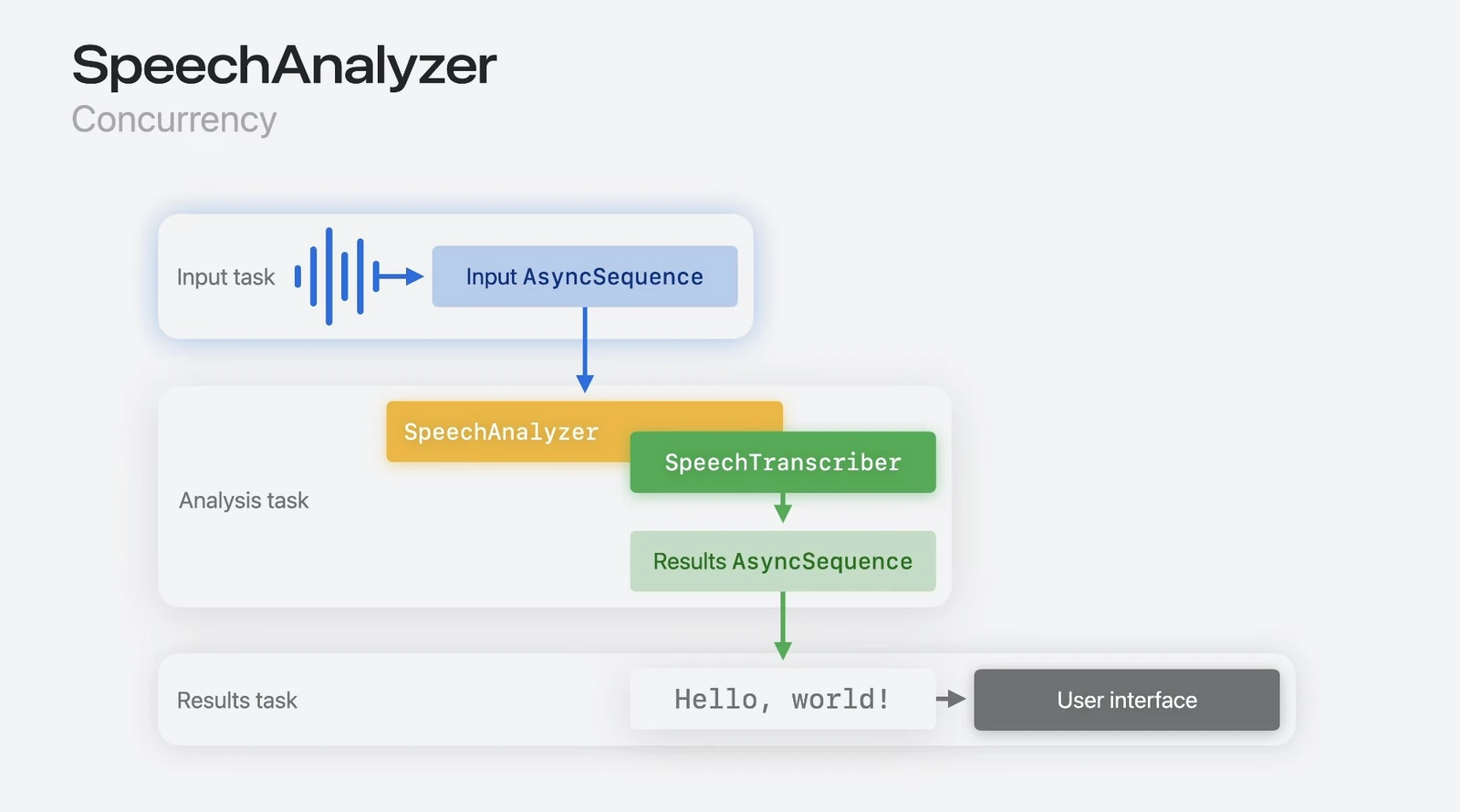
One session, three tasks: audio goes in as an AsyncSequence, SpeechAnalyzer and SpeechTranscriber analyse it, and results come back as a second AsyncSequence for the interface to read. Source: Apple, WWDC25 session 277.
Results arrive twice. Anything inside what Apple calls the volatile range can still be replaced by a better result; anything outside it is final. That is how an app shows a rough transcript while you are still speaking and corrects it afterwards. Apple states five design goals for the SpeechTranscriber model: long audio, conversational speech, distant speakers, low latency, and privacy, meaning it runs on the device. Notes, Voice Memos, Journal and call summarization are built on it.
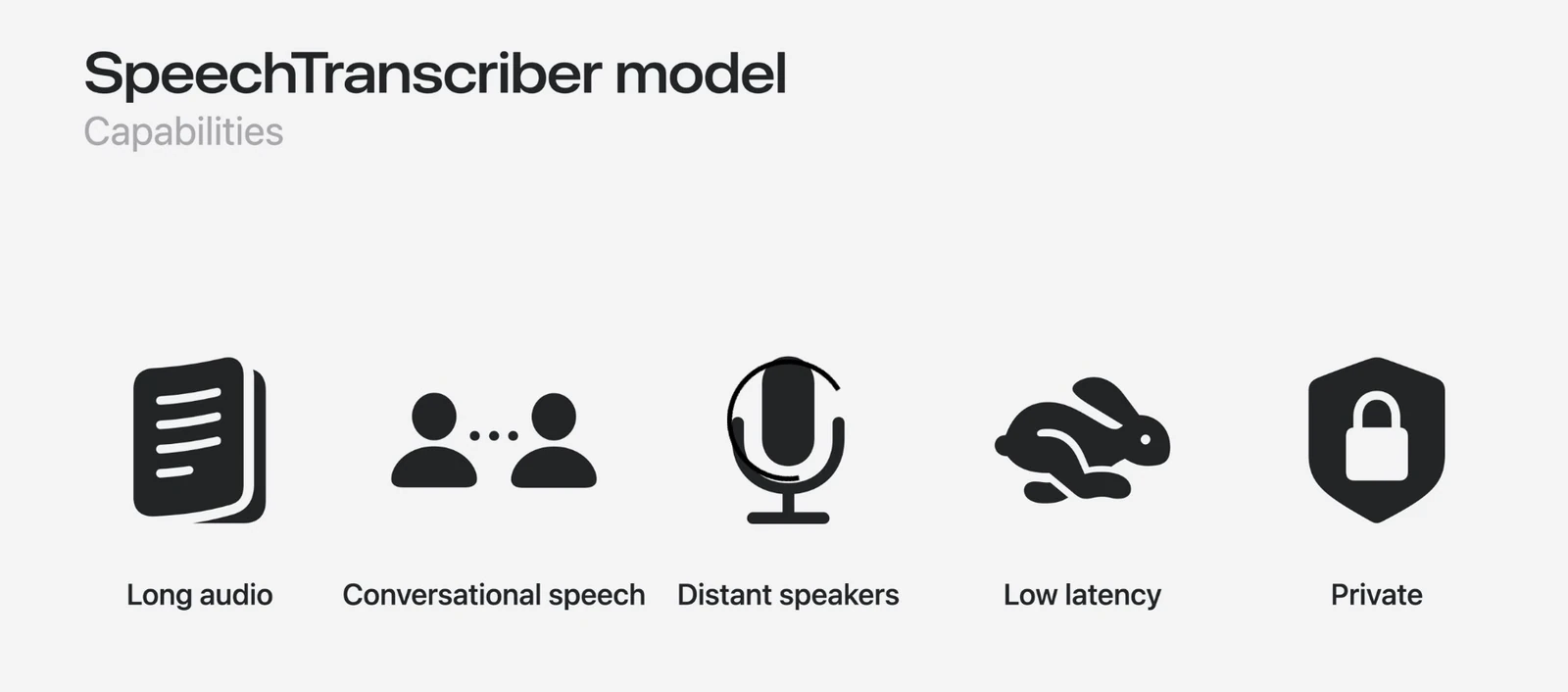
Apple's five stated design goals for the SpeechTranscriber model. Source: Apple, WWDC25 session 277.
The models are not part of any app. They are downloaded from Apple's servers through AssetInventory, stored and updated by the system, and shared between apps. They add nothing to an app's download size, and decoding happens outside the calling process. Where SpeechTranscriber has no model for a language or a device, DictationTranscriber takes over with the same models as system dictation.
Method and limitations
Five of the six engines in these tables are models Whisper Notes downloads. Every engine transcribed the same clips, in the same order, one at a time, on an M5 MacBook Air (32 GB, macOS 27.0). The audio is the Google FLEURS test split at revision 70bb2e84, about 150 sentences and 30 minutes per language. A fixed hash of the dataset's own item IDs puts the items in order, and we take the shortest whole-item run that crosses thirty minutes; no model output had any part in that choice. Every cell was rebuilt from its own receipt and checked again, and all 285 passed. Scores are word error rate where words are separated by spaces, and character error rate for Japanese, Korean, Chinese and Cantonese, never merged into one number.
You can check the Whisper columns against OpenAI's own numbers. On the twelve languages OpenAI publishes a FLEURS result for Whisper Large V3 Turbo, our figures sit within an average of 0.7 points of theirs, and ten of the twelve fall inside our run's 95% interval; on the eleven languages outside the Indic rows, our Whisper Small figures sit within an average of 1.0 point of the per-language table in the Whisper paper. The Apple Speech column came out of the same clips, the same scorer and the same normalizer.
FLEURS is clean read speech. Nothing here says how these engines behave in a noisy room or across a two-hour meeting, and how they separate there is a question we did not measure. All of it ran on one machine. And with about 150 sentences per language, two engines less than about one point apart are a tie; the tables already mark exact ties that way, as on Italian, where Qwen3-ASR 1.7B and Whisper Large V3 Turbo both scored 2.58.
Frequently Asked Questions
Apple Speech or Whisper Small: which is more accurate?
Apple Speech, on eight of the ten languages both measured cleanly. It loses English, 8.80 (Apple Speech) against 7.04 (Whisper Small), and Brazilian Portuguese, 9.35 against 8.61. Its widest margins are Chinese, 7.97 (Apple Speech) against 20.50 (Whisper Small); French, 7.61 against 13.24; Japanese, 6.36 against 11.37; and Cantonese, 8.69 against 119.01. Whisper Small is a 600 MB download and ran at 7.9x realtime, against 30.8x for Apple Speech.
Apple Speech or Parakeet V3: which is more accurate?
Parakeet V3, on every European language both cover: 6.89 (Parakeet V3) against 8.80 (Apple Speech) on English, 5.83 against 7.61 on French, 4.86 against 5.41 on Spanish, 3.43 against 4.39 on Italian and 6.49 against 9.35 on Brazilian Portuguese, level on German at 6.26. Parakeet V3 has no Japanese, Korean, Chinese or Cantonese, so there Apple Speech is the one of the two that exists. Parakeet V3 is a 465 MB download and ran at 75.6x realtime, Apple Speech at 30.8x.
Apple Speech or Whisper Large V3 Turbo: which is more accurate?
Whisper Large V3 Turbo, on eight of the ten languages both measured cleanly: English 5.49 (Whisper Large V3 Turbo) against 8.80 (Apple Speech), German 4.05 against 6.26, Japanese 5.30 against 6.36, Korean 4.25 against 4.31, French 5.97 against 7.61, Spanish 3.62 against 5.41, Italian 2.58 against 4.39, Brazilian Portuguese 5.44 against 9.35. They are level on Chinese at 7.97; Apple Speech leads only Cantonese, 8.69 (Apple Speech) against 36.75 (Whisper Large V3 Turbo). Turbo also covers Dutch, Russian and Polish, at 5.69, 5.13 and 5.45. It is about 1.6 GB and the slowest engine here at 3.0x realtime.
Which languages does Apple Speech support?
In our run Apple Speech returned results in 21 of 83 configurations: English, German, French, Spanish, Italian, Portuguese (Brazil), Japanese, Korean, Chinese, Cantonese, and eleven South Asian languages — Hindi, Telugu, Urdu, Punjabi, Bengali, Nepali, Malayalam, Marathi, Kannada, Gujarati and Tamil — where it answered in English letters, not their own script. No Dutch, Polish or Russian; macOS decides the list per machine. It is closest to the leaders in Korean, Japanese and Chinese, 0.77, 1.06 and 1.48 behind, furthest in English, 8.80 (Apple Speech) against 4.49 (Qwen3-ASR 1.7B), and ahead of the old dictation on all ten both measured. Whisper in Whisper Notes covers the app's whole language list, on every channel.
What is SpeechAnalyzer, and is it the same as Apple Dictation?
SpeechAnalyzer is the API Apple introduced at WWDC 2025 and shipped in macOS 26 and iOS 26. SpeechTranscriber is the transcription engine inside it, this post's Apple Speech; dictation is the older compatibility engine. We ran both, and Apple Speech was more accurate on all ten languages measured cleanly for both. Dictation reaches more languages, 33 configurations against 21, including Dutch, Polish and Russian at 17.34%, 13.50% and 13.13% WER (Dictation), against 5.69%, 5.45% and 5.13% (Whisper Large V3 Turbo).
Does audio leave my Mac when I use Apple Speech?
Apple documents SpeechTranscriber as on-device speech recognition: macOS downloads the language assets once, and recognition runs locally. We measured accuracy and speed, not network behaviour, so we describe that part as Apple describes it. The engines Whisper Notes downloads itself — Whisper, Parakeet V3, SenseVoice and Qwen3-ASR — run on your own Mac's GPU or Neural Engine with no account and no API key, and transcription works with the network off, on every channel. Apple Speech is available in the Mac app you download from our website, on macOS 26 or later: a system engine on your Mac, its language pack downloaded by macOS.
Why do these numbers not match the accuracy I get on my recordings?
Because FLEURS is short, clean, read speech, and your recordings are not. Our run is a calibration on a public dataset: about 150 sentences and 30 minutes per language, one M5 MacBook Air, the same clips for every engine. It says whether an engine is plausible for your language, not what you will get on a meeting, on noisy audio or on a two-hour file.
Try it
The five downloadable models here — Whisper Small, Whisper Large V3 Turbo, Parakeet V3, SenseVoice Small and Qwen3-ASR 1.7B — are all in the Whisper Notes Mac app you download from our website, under Settings, then Transcription Model. On macOS 26 or later, Apple Speech appears in the same list; if you already have the app, update to the latest version.
If our numbers do not match your experience in a language, email mac@whispernotes.app. Full release notes: whispernotes.app/changelog.
Sources: our run on the Google FLEURS test split at revision 70bb2e84, Apple's SpeechAnalyzer documentation, and the thirty-language Qwen3-ASR run before it.
 Download for macOS