
The Privacy of Voice: Why We Chose a Local Architecture
Whisper Notes records and transcribes voice memos on the device, with nothing uploaded.
Voice Memos Are Different
Voice memos are often messy, unfiltered, and personal. They capture thoughts mid-formation: ideas before they are polished, frustrations before they are processed, and observations before they are structured. That rawness is what makes them useful.
A voice memo is usually you talking to yourself, so what ends up in the file is half-finished sentences, tangents and things said without editing. That is worth remembering when deciding where the file goes afterwards.
A Question of Digital Hygiene
Your voice is a biometric identifier. Unlike a password, you cannot reset it. That does not make every voice memo highly sensitive, but it is a good reason to think about where raw recordings are processed and stored.
Cloud processing is reasonable for many casual recordings. For private reflections, professional notes, or client conversations, keeping the raw audio off third-party servers reduces the number of places where a copy can exist.
We built Whisper Notes around that choice: recording, transcription, and storage can all stay on your device.
The Architecture
Whisper Notes runs three speech-recognition engines directly on your hardware, in every version: Parakeet V3, Whisper (Whisper Large V3 Turbo on Mac, Whisper Small on iPhone), and SenseVoice. The Mac app from our website also has a fourth, Qwen3-ASR 1.7B, still in Beta. There is no transcription server; your recordings are processed locally.
Mac and iPhone offer the same three engine families, with runtimes tuned for each platform:
Mac: Choose the Engine for the Language
Parakeet V3 is the default for English and 24 other European languages. SenseVoice is the fast CJK option. Whisper Large V3 Turbo is an 809M-parameter model for the remaining languages in Whisper's 100+ language set. All three run on Apple Silicon, and in the Mac app from our website you can also pick Qwen3-ASR 1.7B (Beta) for its 30 languages.
The model picker makes the trade-off explicit: Parakeet and SenseVoice favor speed in their language groups; Whisper favors broad coverage.
iPhone: The Same Model Lineup, Mobile-Optimized
Mobile devices have tighter thermal, battery, and memory limits. The current iPhone app still offers Parakeet V3, Whisper, and SenseVoice, each using an iPhone-optimized runtime.
On an iPhone 15, the current App Store listing reports about 18 seconds for five minutes of audio with Parakeet and about one minute with Whisper. Older phones take longer, but the work remains on-device.
Designed for Speed
Ideas tend to arrive while you are walking or about to fall asleep. One tap on the Lock Screen Widget opens the app and starts recording.
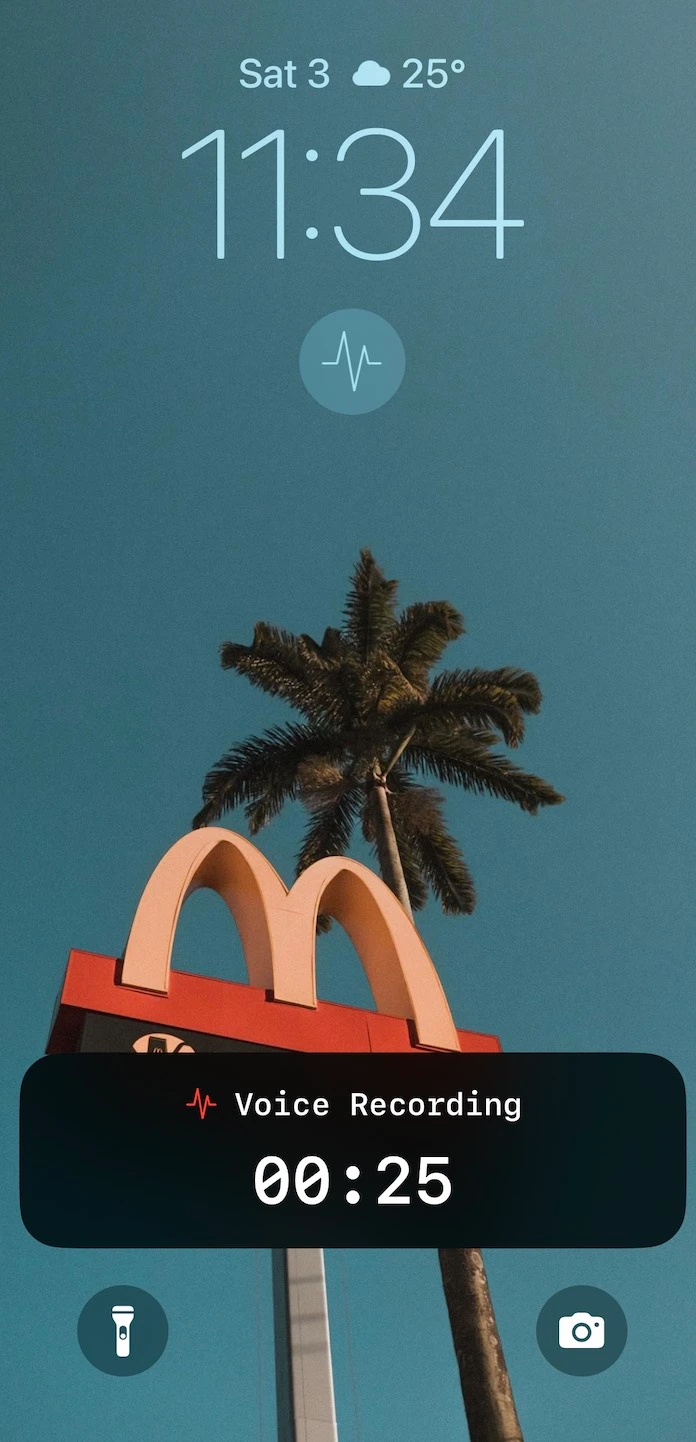
Lock Screen Widget with Live Activity
- • One-tap activation: Start recording directly from your lock screen
- • Live Activity: Visual confirmation of recording duration on the Dynamic Island
- • Face ID Integration: The widget works smoothly with Face ID authentication
The Capture-Review Workflow
The most effective voice memo workflow separates capture from review. Mobile devices excel at quick recording; desktop environments excel at deep editing.
iPhone: Capture
Use iPhone for capturing thoughts when they strike. The Lock Screen Widget reduces friction to a single tap. The mobile model transcribes immediately, giving you usable text right away. Recordings you make elsewhere can go through the Transcribe Audio action in the Shortcuts app, which takes an audio file and returns the text.
Mac: Review
On Mac, Whisper Notes provides tools for deeper work:
- • Model choice: Use Parakeet, SenseVoice, or Whisper according to the recording language
- • Timestamped paragraphs: Click any paragraph to jump to that moment in the audio
- • Synchronized playback: Text highlights as audio plays
- • Export flexibility: Plain text, timestamped format, or SRT and VTT subtitles
- • Markdown files: Every transcript is also saved as a .md file next to its audio, in a folder you choose (an Obsidian vault works)
- • System-wide dictation: Hold Fn to dictate directly into any app
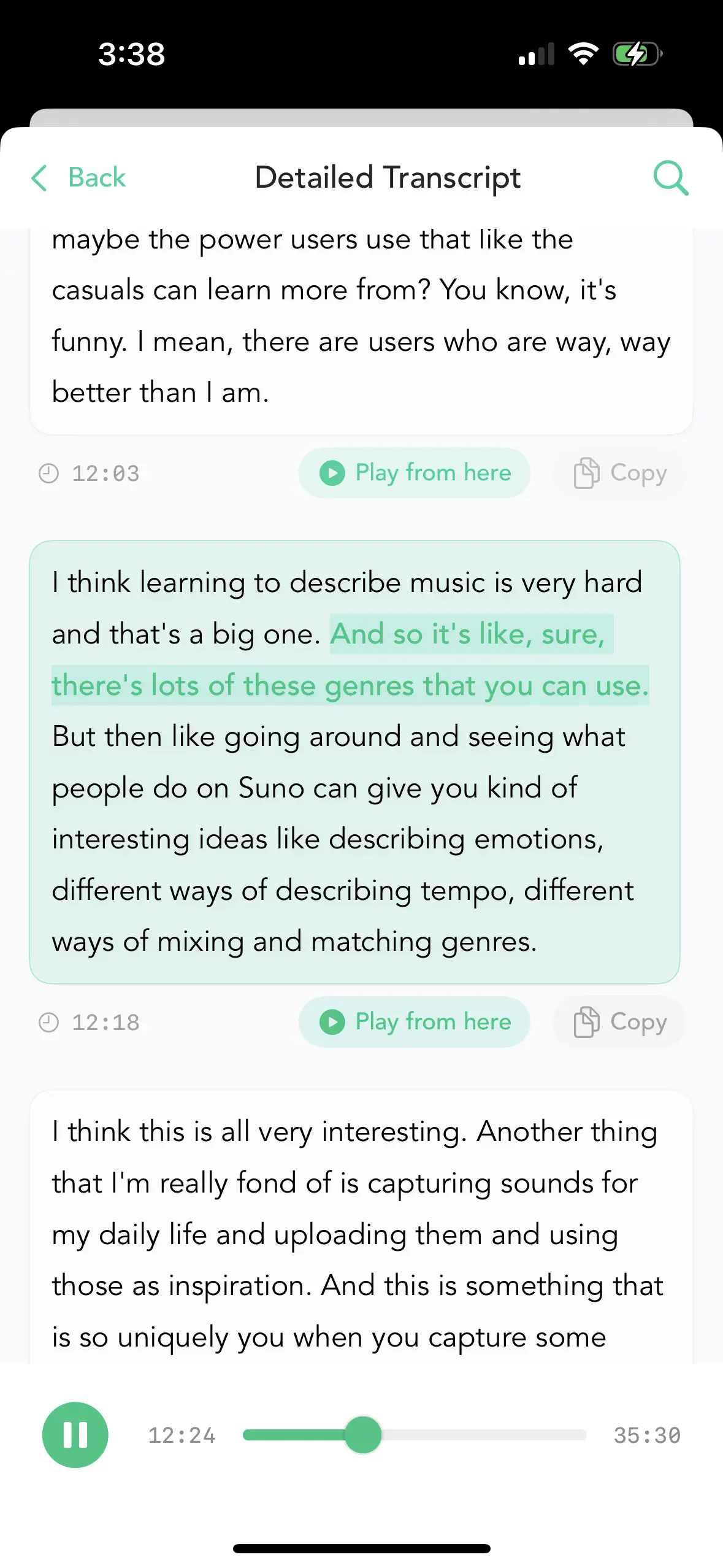
Timestamped transcript with synchronized audio playback
Speaking Freely
The architecture also changes how some people use the recorder.
If the audio never leaves your device, you can record half-formed thoughts, frustrations, rough ideas or sensitive work matters without wondering who else might hear them later.
It is similar to writing in a physical notebook: knowing where the only copy lives can make it easier to speak candidly.
The Economic Model
Since all processing happens on your device, there are no transcription server costs that scale with usage. Whisper Notes costs $7.99 once on iPhone. On Mac, 5,000 words a week are free, then $14 once.
No subscriptions. No per-minute charges. No usage limits.
Whisper Notes vs. Whisper Memos: Not the Same App
A clarification worth making, because the names are easy to confuse: Whisper Memos is a different product from a different developer. Both build on OpenAI's Whisper, but the architectures are opposites. Whisper Memos' privacy policy says that transcription entails sending the audio file to OpenAI. Whisper Notes has no transcription server: your audio is recorded, transcribed, and stored on your device only.
| Whisper Notes | Whisper Memos | |
|---|---|---|
| Where audio is processed | 100% on-device | Cloud — audio is transmitted to OpenAI's Whisper API |
| Pricing model | One-time: $7.99 on iPhone; $14 on Mac, 5,000 words a week free | $10/month, or $60/year billed annually |
| Platforms | iPhone and Mac (Apple Silicon) | iPhone and Apple Watch |
| Works offline | Yes — no internet needed, ever | No — transcription requires a connection to cloud services |
To be fair to both: if what you want is Apple Watch recording with transcripts delivered to your email, Whisper Memos is a purpose-built cloud tool for exactly that — but if your priority is that your audio never leaves your device, only local processing can guarantee it.
The Trade-offs
Local processing involves real trade-offs worth understanding:
Considerations
- • Processing speed: Speed depends on the model and device. The App Store listing reports about 18 seconds for five minutes of audio with Parakeet on iPhone 15, and about one minute with Whisper.
- • Accuracy: On clear speech, error rates are in the single digits. Heavy accents or loud background noise may require some editing.
- • Platform: Apple Silicon Mac, or iOS 18 and later. iPhone 12 and newer are recommended. No Android or Windows version.
- • Recording workflow: Voice memos are transcribed after capture. On Mac, Fn-key system-wide dictation is a separate feature for short voice input in any app.
When This Approach Fits
Whisper Notes works well for:
- • Privacy-conscious professionals: Legal, medical, journalism, therapy
- • Personal reflection: Journaling, idea capture, processing thoughts
- • Offline environments: Airplanes, secure facilities, unreliable connectivity
- • Subscription-fatigued users: One payment, permanent access
When to Consider Alternatives
Cloud services may be better if you need:
- • Real-time transcription shared with a team
- • Instant processing for very long recordings
- • Android or Windows support
Summary
Whisper Notes is built on a simple premise: voice memos are personal, and you should control where the audio lives. A local-first architecture keeps that option available without claiming that cloud tools are wrong for every workflow.
Parakeet V3, Whisper, and SenseVoice are available on both Mac and iPhone. Both platforms process recordings entirely offline.
$7.99 once on iPhone. On Mac, 5,000 words a week free, then $14 once. Either way, your audio stays on your device.
Frequently Asked Questions
What is the most private voice memo app?
One that never uploads your audio. Whisper Notes records and transcribes entirely on-device with Parakeet V3, Whisper, or SenseVoice; there is no transcription server, so recordings are processed locally and never transmitted for transcription.
Can I transcribe voice memos without an internet connection?
Yes. Whisper Notes processes everything locally on both Mac and iPhone — with Parakeet V3, Whisper, and SenseVoice models running on-device — so it works on airplanes, in secure facilities, and anywhere with unreliable connectivity.
Does the iOS 18 Voice Memos transcription work offline?
Yes. Apple's built-in Voice Memos transcription in iOS 18 and later also runs on-device. Whisper Notes requires iOS 18 as well, but adds arbitrary audio import, 100+ language Whisper coverage, SenseVoice for Chinese, Japanese, Korean, and Cantonese, and export formats including TXT, SRT, and VTT. iPhone 12 and newer are recommended.
Why is voice data more sensitive than text?
Your voice is a unique biometric identifier. Unlike a password, you cannot reset it, and unlike a credit card number, you cannot request a new one — so keeping raw audio files off the cloud is simply good digital hygiene.
Does Whisper Notes require a subscription?
No. Whisper Notes is a one-time purchase: $7.99 on iPhone and $14 on Mac, with 5,000 words a week free on Mac. There are no per-minute charges or subscription limits.
 Download for iOS