
Whisper Notes for Mac
The Mac app from our website types what you say, records meetings, tells speakers apart and turns your recordings into text. All of it runs on your Mac.
Free for 5,000 words a week, then $14 once for unlimited use.
For Macs with Apple silicon (M1 or later) and macOS 14 or later.
Whisper Notes for Mac runs only on a Mac. Copy the link and open this page on your Mac.
On iPhone and iPad: Whisper Notes for iPhone
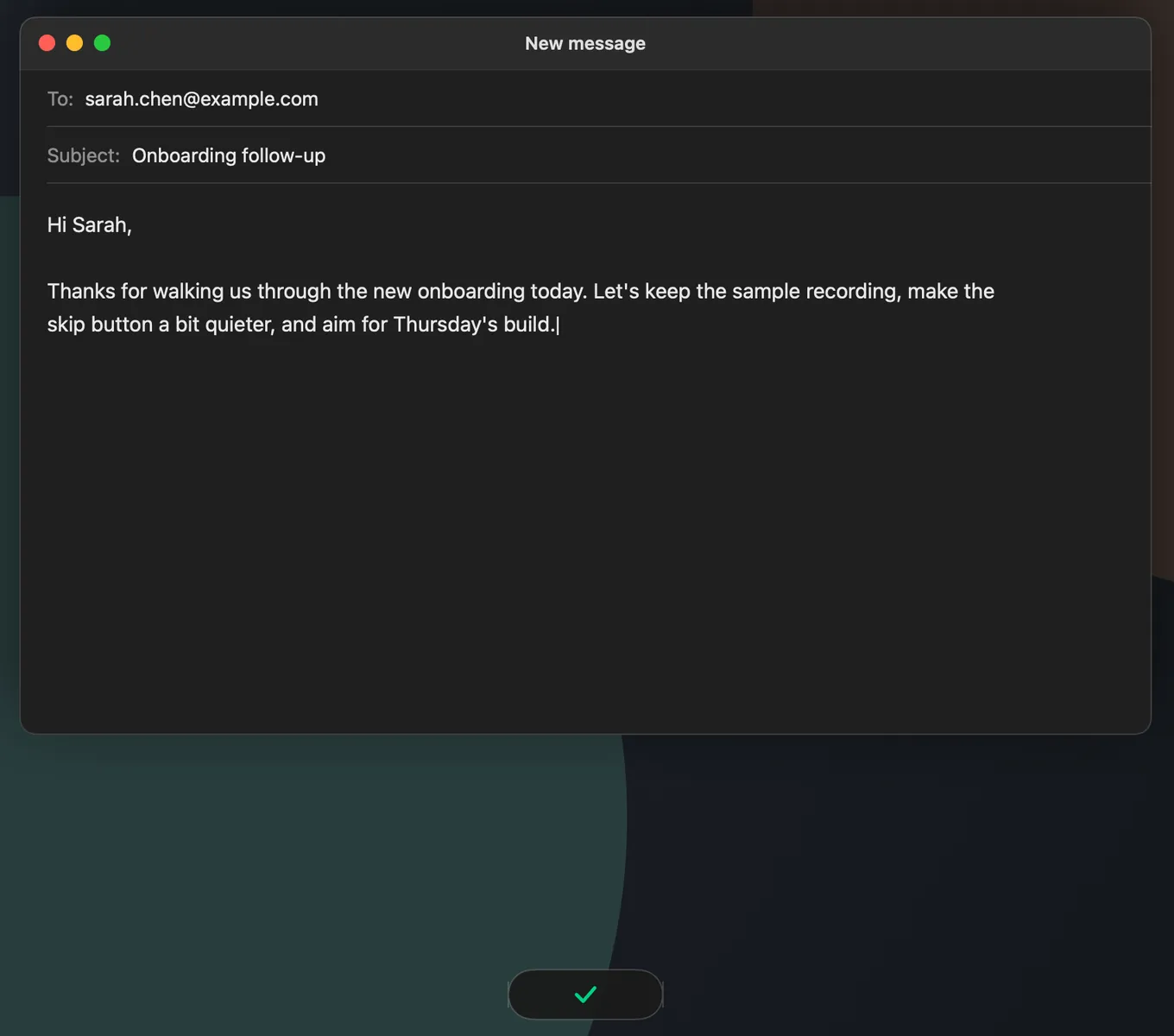
Voice Typinghold Fn, speak in any app
Hold Fn, speak and let go: the text lands at your cursor in Mail, Slack, a browser or a code editor, transcribed offline on your Mac. With the built-in Parakeet, your words appear in a small bar while you speak.
Voice typing works in about 100 languages: pick a model that covers yours, and the text is typed when you release the key. You can use another shortcut instead of Fn, and macOS asks once for permission to type into other apps.
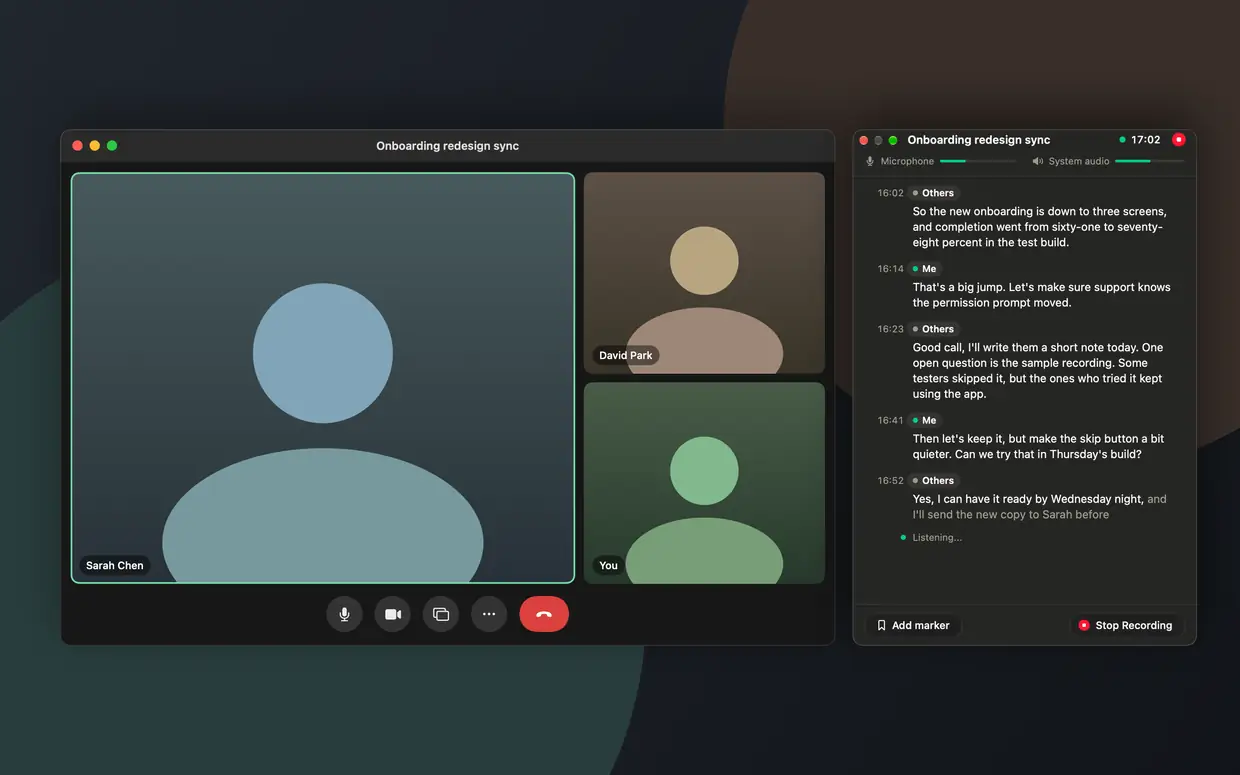
Meetingsrecorded on your Mac, no bot
Whisper Notes records Zoom, Teams, Google Meet, FaceTime, Webex and browser calls from your Mac's sound and your microphone, so no bot joins the call. When a Zoom, Teams or Google Meet call starts, it asks whether to record.
A live panel shows the conversation as you talk, with your lines marked Me: about 1–2 seconds behind in English and 24 other European languages, about every 30 seconds in other languages. The full transcript is made on your Mac when the meeting ends. Recording meetings needs macOS 14.4 or later.
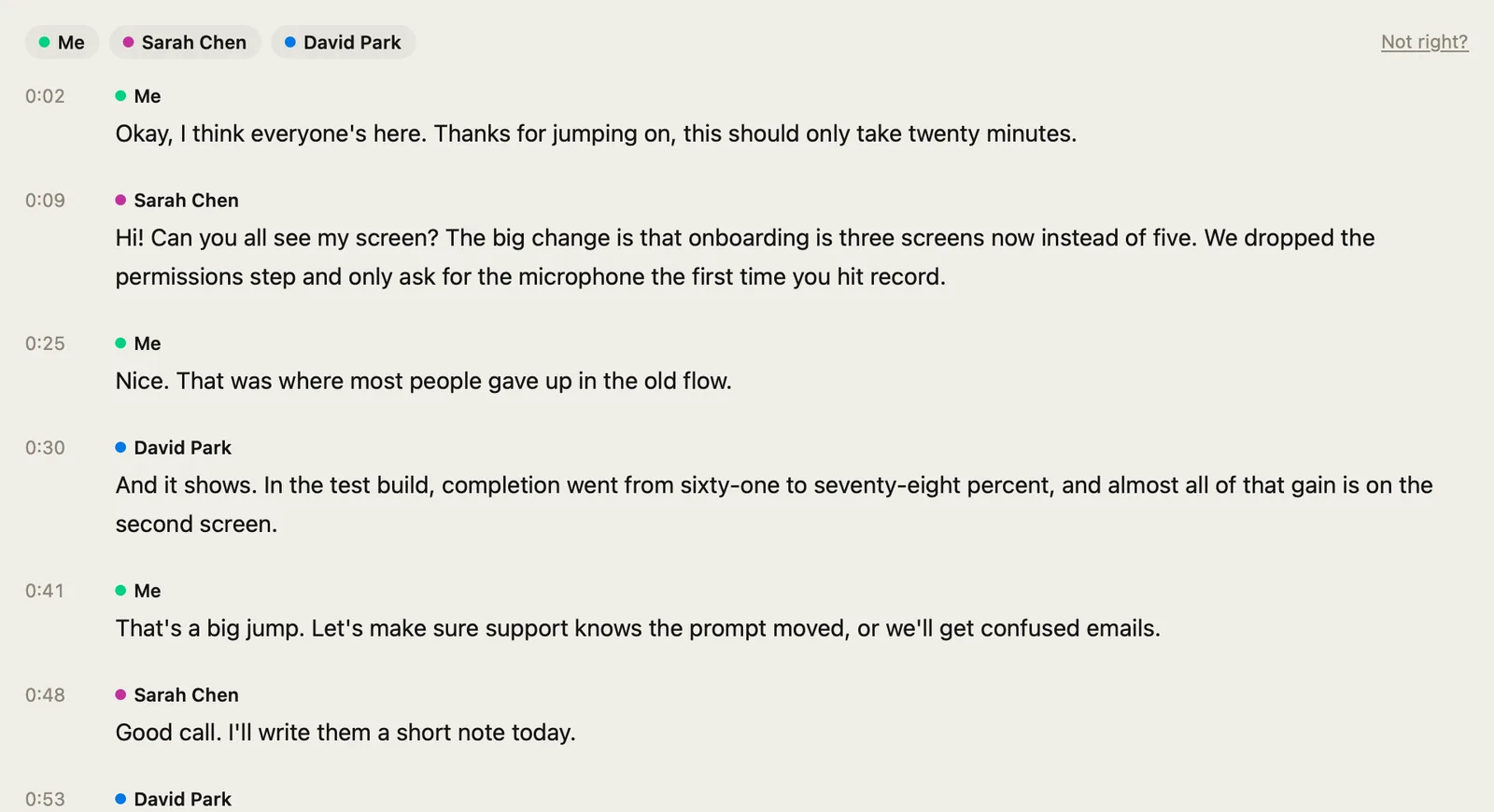
Speaker Identificationclick any line to hear it
Run speaker identification on a recording and Whisper Notes splits it among up to 8 speakers; until then, a meeting shows Me and Others. Rename a speaker, give two speakers the same name to merge them, or move a line to someone else. Every change can be undone.
Click a line and playback starts there, with the sentence being played highlighted. Speaker names carry into copies and exports.
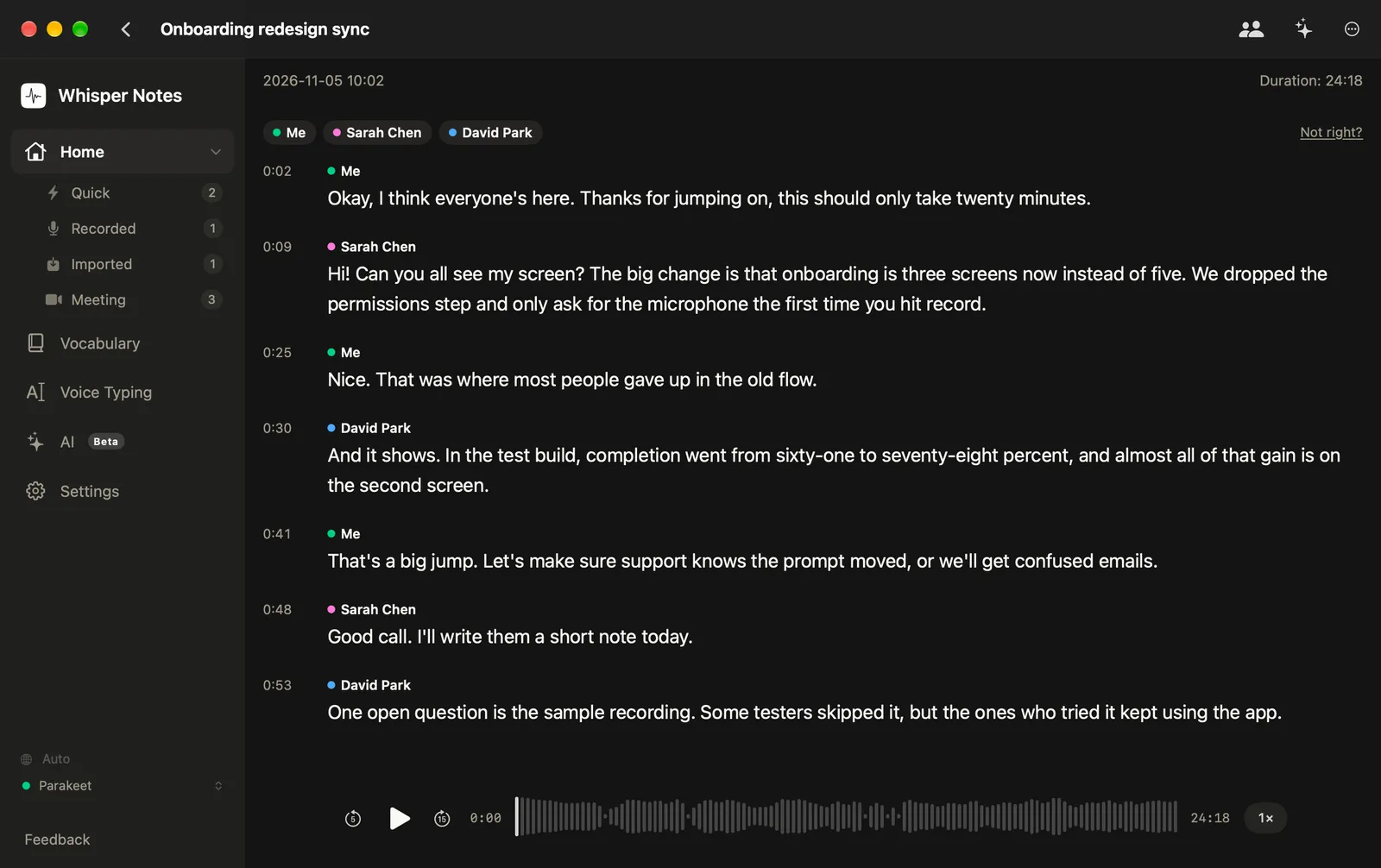
Import and Transcribeaudio and video to text
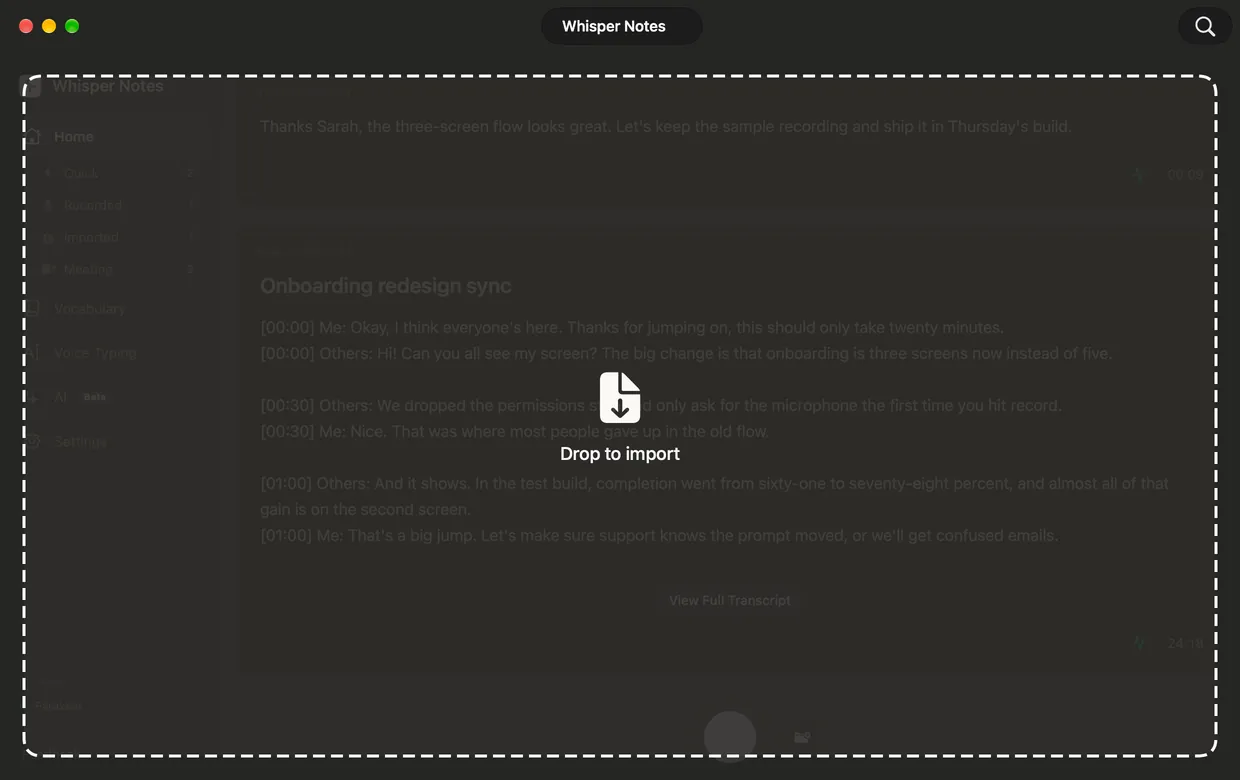
Drop recordings and videos onto the window, or choose them in Finder: MP3, M4A, WAV, MP4, MOV and other formats macOS can open, each up to 24 hours. Drop several and they are transcribed one after another.
Export TXT, Markdown, SRT or VTT, with timestamps and speaker names, for a document or a video editor.
Price
Whisper Notes for Mac is a one-time purchase: $14 once for unlimited use on two Macs, no subscription, and the first 5,000 words every week are free.
 Mac app from our website
Free
5,000 words a week
- Every feature and every model
- No account
$14USD
one-time purchase
- Unlimited words
- One license key for 2 Macs
- Personal and commercial use
Try Free on Mac- Free for the first 5,000 words every week, with every feature and model.
- $14 once for unlimited use. No subscription.
- Two Macs on one license key, for personal and commercial use.
The $7.99 App Store purchase covers iPhone, iPad and the Mac App Store version, not this app.
Does the Mac have built-in transcription?
Yes, in four apps that come with macOS, each with limits:
- Dictation types what you say wherever you can type, and stops after 30 seconds without speech. Keyboard settings show whether it is processed on your Mac or sent to Siri servers. (Apple Support)
- Voice Memos transcribes its own recordings on a Mac with Apple silicon and macOS 15 or later. It is not available in every country or region. (Apple Support)
- Notes records audio in a note and transcribes it as you speak, on a Mac with M1 or later, when the Mac's language is one of the ten Apple lists. (Apple Support)
- Live Captions captions what your Mac plays or hears, processed on the Mac. It needs Apple silicon and is not available in every language or region. (Apple Support)
For a short message or a memo, they are enough. None of them labels speakers or saves a subtitle file; you copy the text out. Whisper Notes adds speaker labels, SRT and VTT files, many files at once, meetings from any call app and about 100 languages.
Is this MacWhisper?
No. MacWhisper is a different Mac app, made by another developer, and both can run Whisper models on your Mac. How Whisper Notes compares with MacWhisper, including MacWhisper's free and Pro versions.
Also in the Mac app
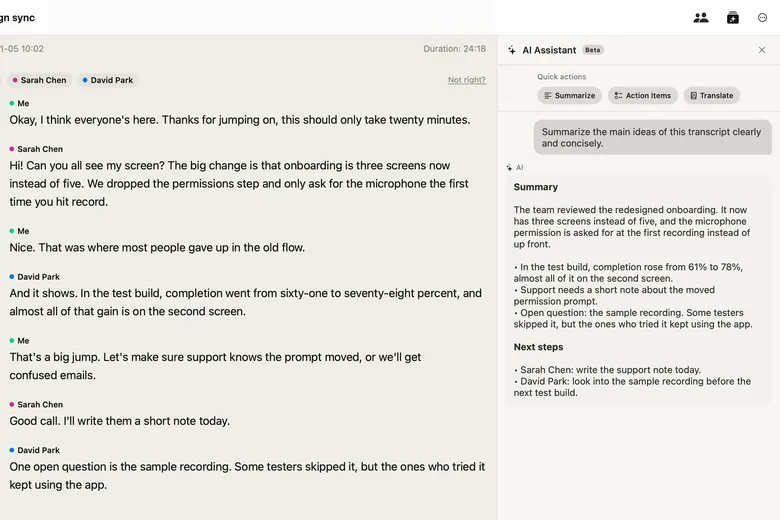
On-device AI Assistant
Summaries, action items, translations and questions about a transcript, when you ask. The model runs on your Mac and is a separate download of about 5 GB.
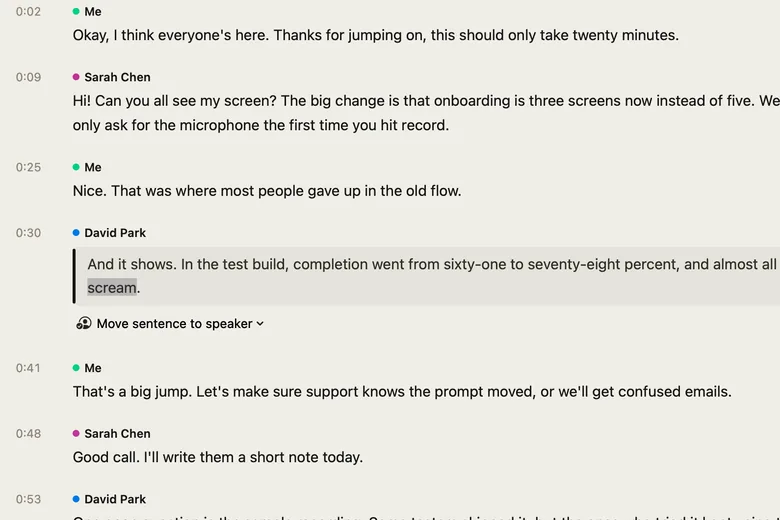
Edit in Place
Fix a word where you read it. Re-transcribing asks before it replaces your edits.
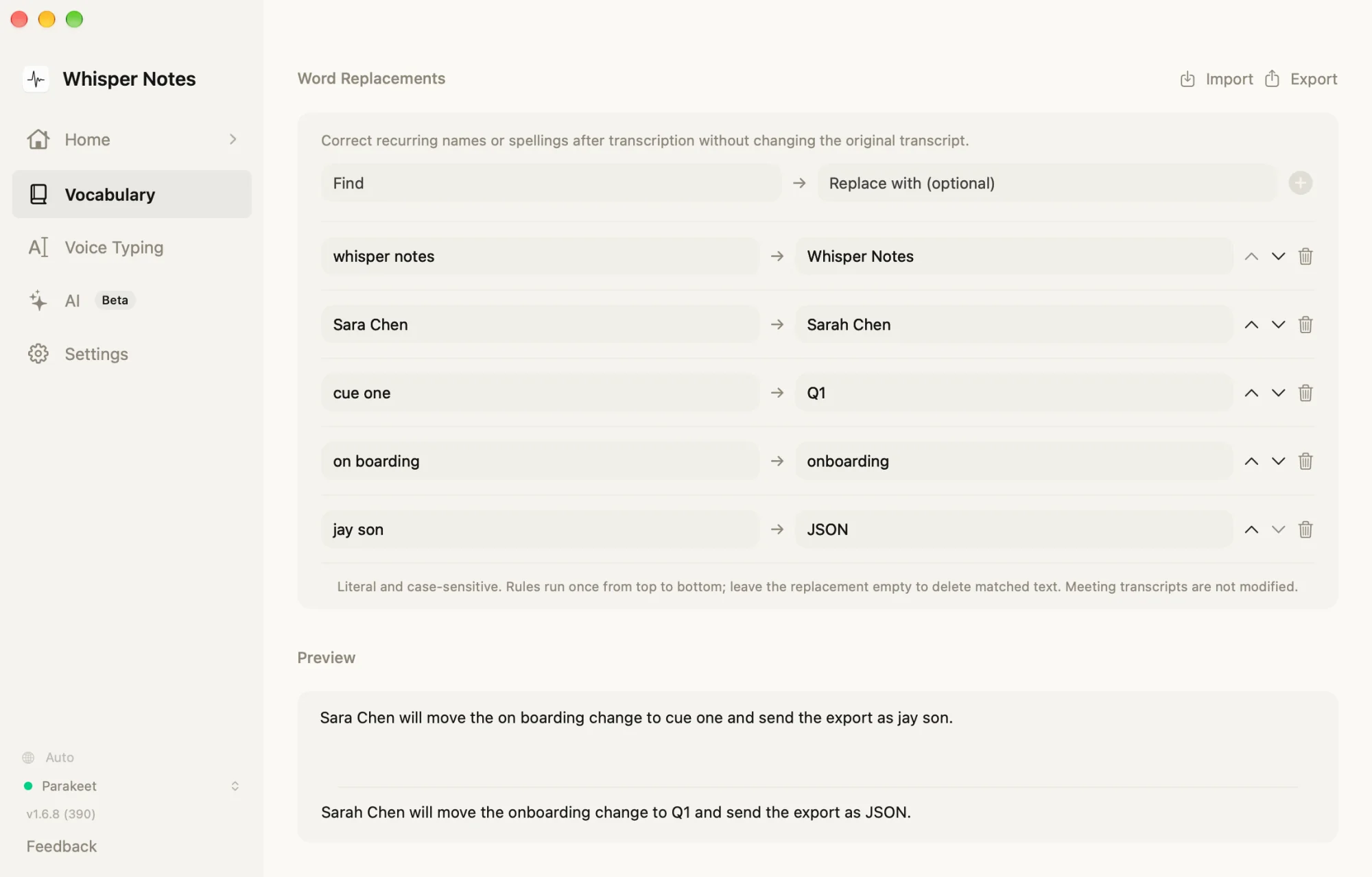
Vocabulary and Replacements
A word list for the Whisper models, and up to 5,000 replacement rules for every model.
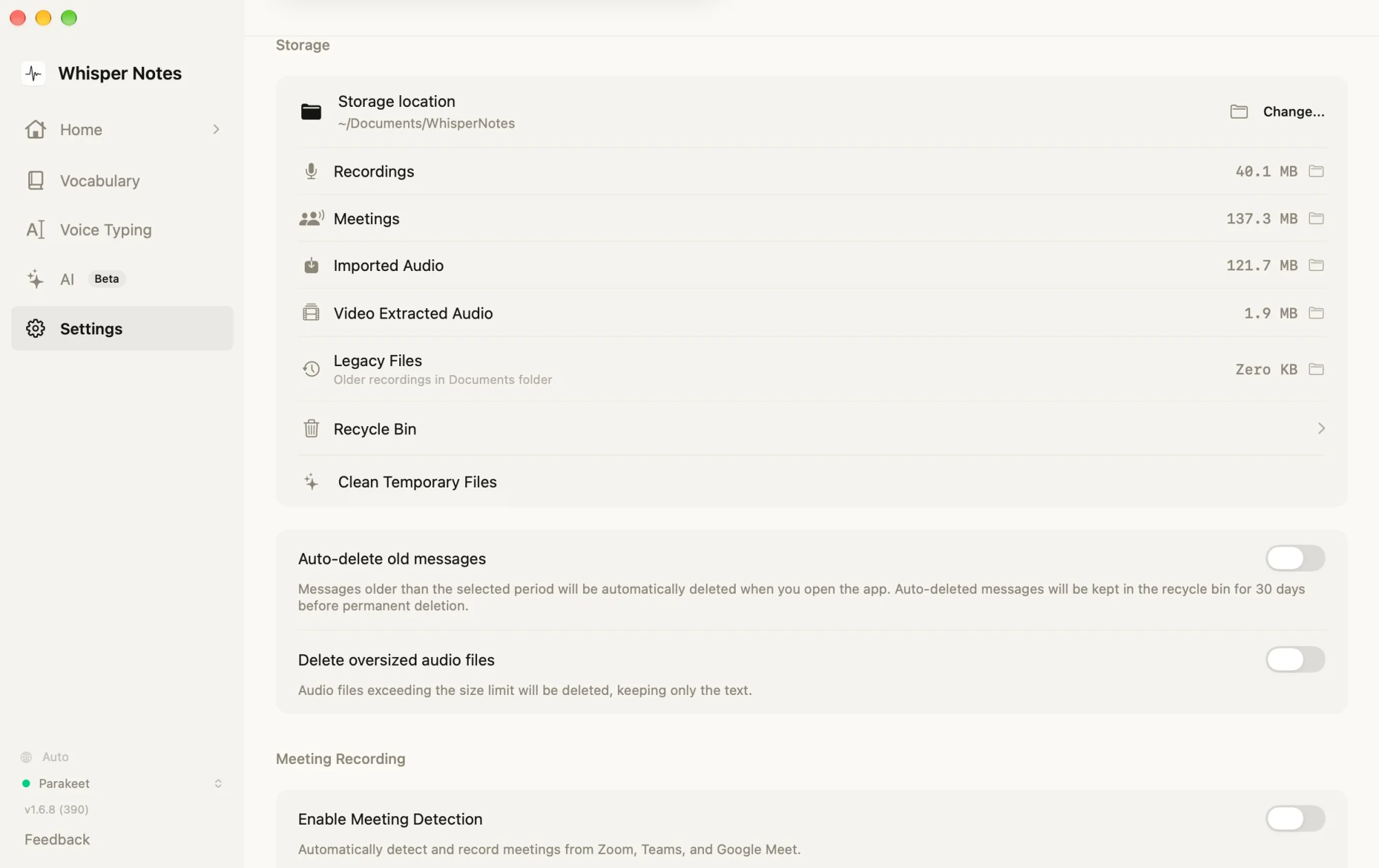
Markdown in Your Folder
Each transcript is also saved as a Markdown file next to its audio, in your library folder (~/Documents/WhisperNotes unless you pick another), ready for Obsidian.
Transcripts in your own folder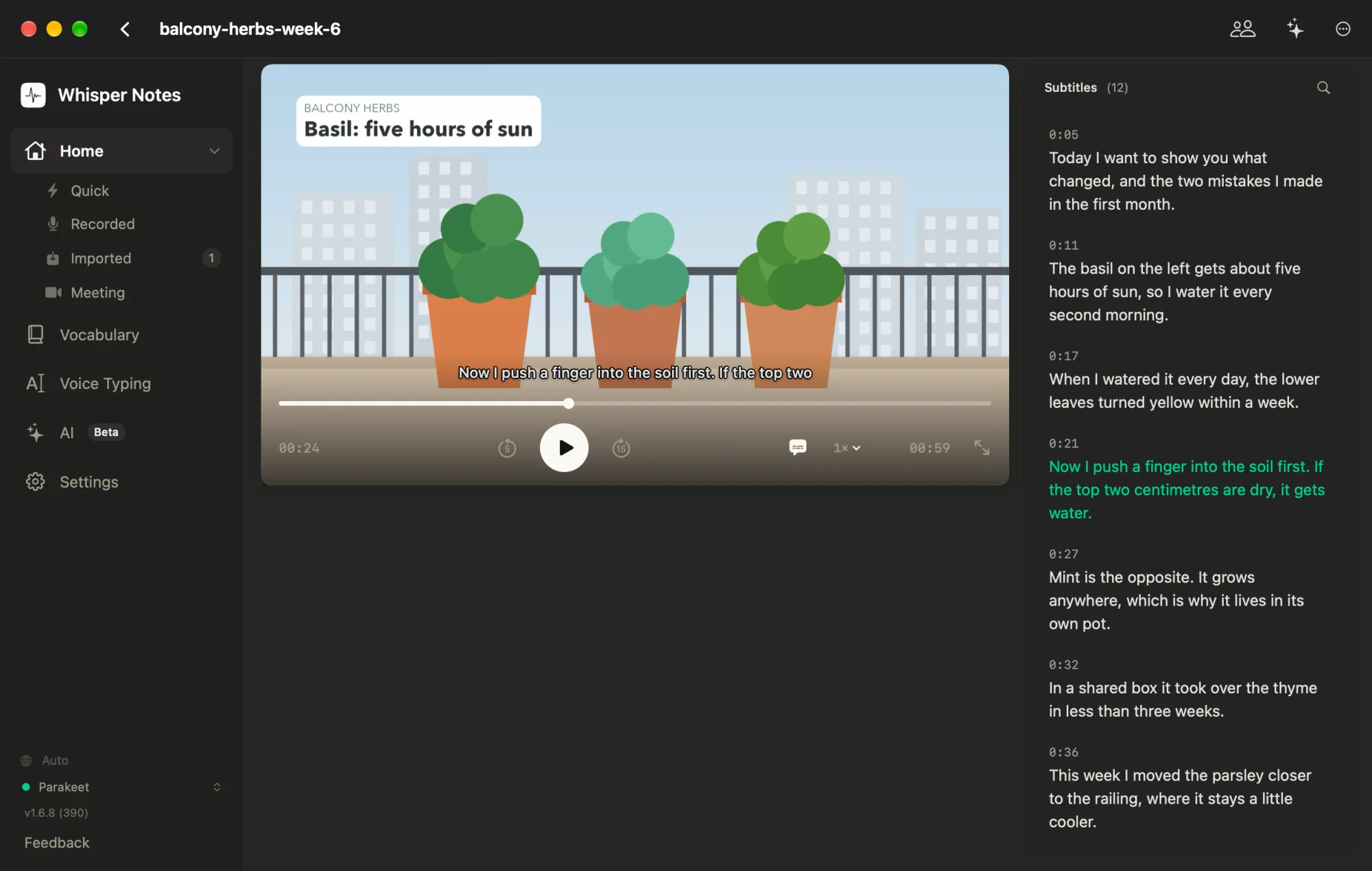
Video Notes
Watch a video with its transcript as subtitles you can edit, move and resize.
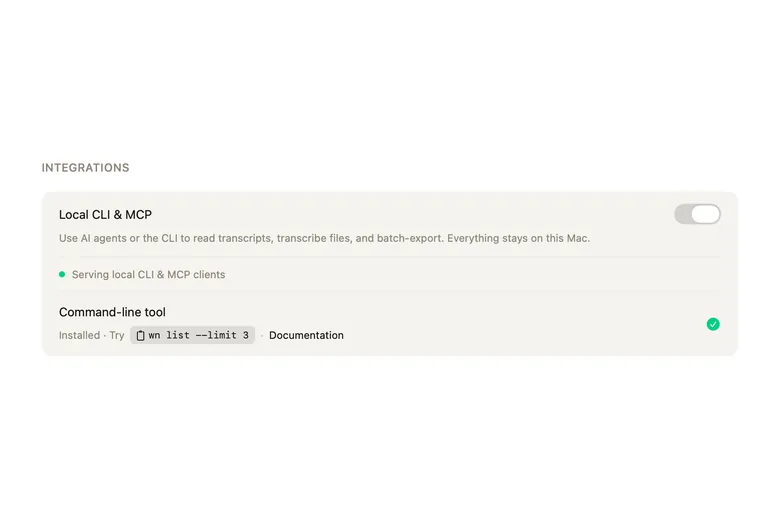
CLI and MCP
The whispernotes command and an MCP server let scripts and AI agents transcribe files and search your transcripts.
CLI and MCP docs
And: start a meeting recording or copy your last transcription from the menu bar, full VoiceOver support, and 32 interface languages.
Models and languages
Parakeet is built in and works offline from the first launch. The other models are optional downloads in Settings, and every one of them runs on your Mac.
| Model | Languages | Good for |
|---|---|---|
| Parakeet (built in) | 25 European languages, detected automatically | English and other European languages; the fastest, with text appearing while you speak |
| Whisper Large V3 Turbo | About 100 | Japanese, and the languages Parakeet doesn't cover |
| Whisper Small | About 100 | A smaller download than Turbo |
| SenseVoice Small | Chinese, Cantonese, Japanese, Korean, English | Chinese, Japanese and Korean at high speed |
| Qwen3-ASR 1.7B (Beta) | 30 | Chinese, Cantonese and Korean; macOS 15 or later, 16 GB of memory recommended |
| Apple Speech | Those Apple supports | Apple's own model; macOS 26 or later, with language packs that macOS downloads |
With Parakeet, an hour of audio in English or another of its 25 languages is transcribed in under a minute on an M4 Mac, about 74× real time.
Which model to use for your language · Every supported language
Privacy
Your recordings and transcripts never leave your Mac. We can't see them, and they are never used to train AI.
Transcription, voice typing, speaker identification and the AI assistant all run on your Mac.
The app downloads the models you choose and checks for updates. It works fully offline; to stop the update check, turn off Settings → General → Automatically check for updates. Privacy policy
Questions
Is Whisper Notes for Mac free?
The first 5,000 words every week are free, with every feature and model. After that, a license is $14 once for unlimited use; there is no subscription.
Which Macs does it run on?
Macs with Apple silicon (M1 or later) and macOS 14 or later. Recording meetings needs macOS 14.4 or later, Qwen3-ASR and Translate need macOS 15, and Apple Speech needs macOS 26.
Does it run on an Intel Mac?
No. The Mac app from our website needs Apple silicon. The Mac App Store version can also be installed on Intel Macs, without SenseVoice, Qwen3-ASR, Apple Speech or the fast live transcript.
How is it different from the Mac App Store version?
This page is about the Mac app from our website. The Mac App Store version records meetings, labels speakers and transcribes files with the same models, but it has no voice typing with Fn, no AI assistant and no command line. It comes with the $7.99 App Store purchase that also covers iPhone and iPad; the $14 license is for the app from our website. The two can't be installed side by side. Moving from the App Store version
Can I move my license to another Mac?
Yes. One license key works on two Macs. To move it to a new Mac, choose Remove from This Mac in the app's Settings on the old one, or email us and we'll free up the spot.
Can I get a refund?
Yes. Email us from the address you bought with, and we refund a Mac license within 24 hours, no questions asked. Refund policy
Which languages does it transcribe?
About 100. The built-in Parakeet covers 25 European languages, Whisper about 100, and SenseVoice and Qwen3-ASR cover Chinese, Cantonese, Japanese and Korean. Every language by model
Does it work offline?
Yes. Once the models you use are on your Mac (Parakeet is built in), transcription, voice typing, meetings and speaker identification work without an internet connection.
How does it update?
When a new version is out, a button appears in the app's sidebar; there are no pop-ups. To stop the app from checking, turn off Settings → General → Automatically check for updates.
Free for 5,000 words a week, then $14 once.
Whisper Notes for Mac runs only on a Mac. Copy the link and open this page on your Mac.
Whisper Notes also runs on iPhone and iPad: Whisper Notes for iPhone